


How to embed mts files to Flash web on Mac?
High-definition mts video or HD video refers to any video system of higher resolution than standard-definition (SD) video, and most commonly involves display resolutions of 1280×720 pixels or 1920×1080 pixels.
Nowadays, canon, panasonic, jvc, sony avchd camcorder are warmly welcomed, people use them record video in avchd.mts formats. However, if you like to upload/embed your mts files to your personal site or blog or even other websites, mts will not be the right formats. You will need to convert mts files to flash flv/swf, but how?
mts to flash converter for mac can just do you a favour. It supports convert mts files, avchd, m2ts files to flash to flv to swf with a HTML web page generate automatically and publish to web on mac.
With mts to flash converter mac, you can customize and edit the video as you wish, including select the player skin, apply special effect, preload templates, add text/image to video as watermark, embed URL in video,clip, crop, merge, apply effect, slide, taking audio & video settings etc on Mac.
Guide: step by step convert mts files to flash on Mac
Download and install mts video to flash converter
Secure Download
Secure Download
Import the MTS file
You can edit the video, like trim/crop/add watermark/add special effects etc.
Set the export format and export folder
Here, you can just click "customize" the there are three steps, you can set output formats, output parameter, and customize video.
Click "start" to convert mts files to flash
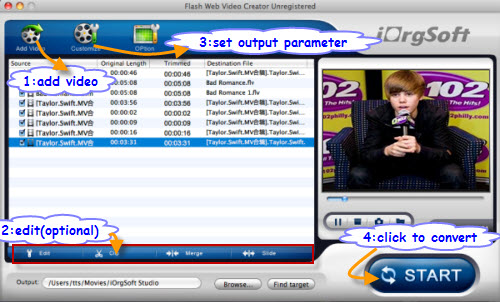
At last convert it to Flash video. This software can generate a HTML file as well; you can open it with notepad and copy code. Or you can use the HTML file directly.
Related Articles
- Import Canon hf s20 video to Mac
- MTS video files Editor for Mac
- Convert AVCHD MTS to MP4 (H.264) for Vimeo
- Convert mp4 to flash web page on mac
- Best PDF to Flash SWF Creator to Create Flash Fipper Book from PDF files
- Photo slideshow maker on mac, embed flash slideshow to web
- How to convert AVI to Flash on Mac os x?
- F4V to Flash converter mac convert F4V to Flash FLV/SWF/HTML on Mac
Hot Article
- Step by step convert, edit, customize video using Flash web video creator Mac
- Best PDF to Flash SWF Creator to Create Flash Fipper Book from PDF files
- How to Upload PDF Files to Blog Easily on Mac
- Convert mp4 to flash web page on mac
- SWF to MP4 Converter for Mac lion
- How to convert AVI to Flash on Mac os x?
- How to Turn SWF Files to AVI format with SWF to AVI Converter for Mac
- Embed Windows Movie Maker Photo slideshow to Web
- Mac SWF to GIF Converter
- Convert MOV to Flash



