

iOrgsoft PDF to EPUB Converter for Mac is a handy and powerful tool made to help eBook users to get kind of quick and easy reading PDF file experience. It can convert PDF files to EPUB format to make it easy to read PDF files on eBooks. With this software, PDF to EPUB conversoin can be completed within only a few simple steps without any special technical skills due to the fast conversoin speed and intuitive interface. Now, follow the guide below to see how.
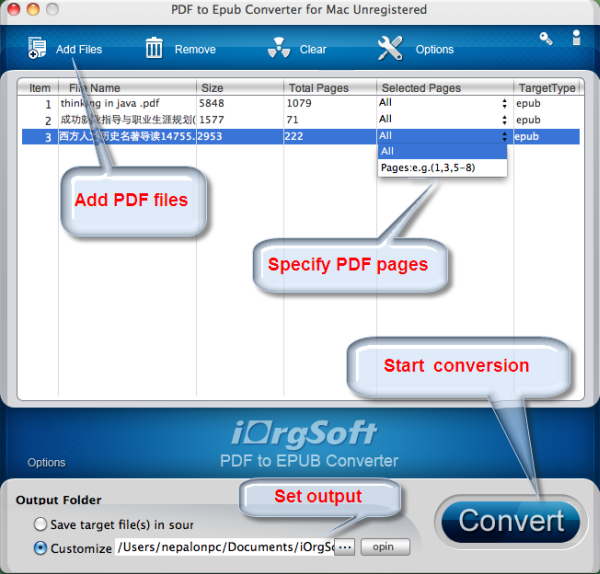
First of all, you need to download and install this Mac PDF to EPUB Converter on your Mac, luanch it following the instrution while installing the program or double click the icon on the desktop. The following interface will appear once you start this program.
Next, click on the "Add Files" button to browse and import the PDF files to the software. You are allowed to add multiple files to the program as batch covnersion is supported. After the files are added, you can check the file size, pages etc in the interface.
If you do not want to convert all the PDF files to EPUB, you can specify some pages by input the page number in the "Selected Pages" area.
You can customize the output path to save the converted EPUB files. After the converions, you can directly hit Open button to find the generated files.
After setting the destination path, hit on the ' Convert ' button to start the PDF to EPUB conversion. You will get the EPUB files in a few sencods.
$49.95
Fast convert PDF to Epub files massively or partially on Mac with original images, hyberlinks, etc


$69.95 $49.95
Fast convert Adobe PDF focuments to other format files like Word, Text, Image, Epub, and HTML on Mac
$49.95
Work independently to convert all PDF files to Html without Adobe programs support.




Terms & Conditions| Privacy| Sitemap| Contact Us| About Us| Affiliate| Newsletter| License Agreement| Uninstall
Browser compatibility : IE/Firefox/Chrome/Opera/Safari/Maxthon/Netscape
Copyright © 2007-2016 iOrgsoft Studio All Rights Reserved