

If you are building a website, probably you need to upload some PDF content to your site. If this is the case, converting PDF to HTML document may be a good choice for you. This guide will tell you how to convert PDF to HTML on Mac.
iOrgsoft PDF to HTML Converter is a specially designed program for Mac users to convert PDF files to HTML on Mac OS X. It can help you convert the while PDF document or some certain pages in the file to HTML for use. The well-desighed program comes with an intuitive interface, so, no special skills are needed when using this software. The below guide will show you steps to convert PDF files to HTML.
Download the Mac PDF to HTML Converter from iOrgsoft site, install it to your Mac and run it by double-clicking the icon which is generated while installation on the desktop.
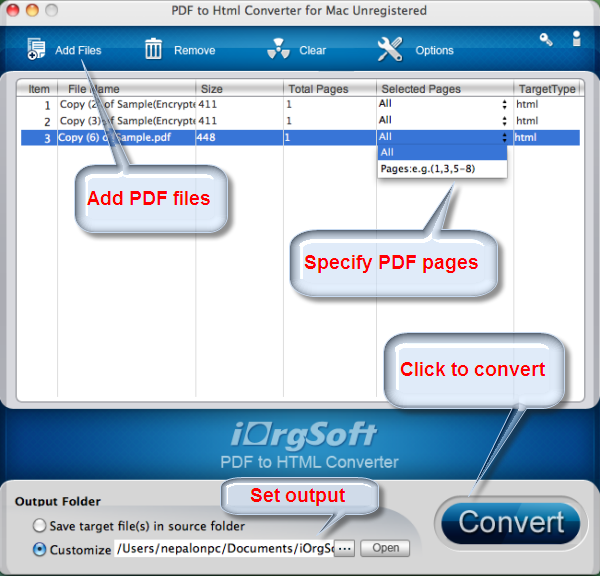
After you launch the PDF to HTML converter, hit on the "Add Files" button to import the PDF files that you want to convert. Some general information about the PDF files will dispplay on the interface after you add them to the program.
This PDF to HTML Converter allows you to convert all pages in the PDF file or select certains pages to convert to HTML. You just need to input the page number to the "Selected Pages" area, this program will convert the selected pages to HTML.
Before start conversion, you can set an output path to save the converted HTML document. You just need to hit the Customize box to set a folder as the destination path.
Finally, when you finish all necessary settings, hit the Convert button to start the PDF to HTML conversion. After the conversion completes, you can hit the Open button to find the generated HTML files.
$49.95
Fast convert PDF to Epub files massively or partially on Mac with original images, hyberlinks, etc


$69.95 $49.95
Fast convert Adobe PDF focuments to other format files like Word, Text, Image, Epub, and HTML on Mac
$49.95
Work independently to convert all PDF files to Html without Adobe programs support.




Terms & Conditions| Privacy| Sitemap| Contact Us| About Us| Affiliate| Newsletter| License Agreement| Uninstall
Browser compatibility : IE/Firefox/Chrome/Opera/Safari/Maxthon/Netscape
Copyright © 2007-2016 iOrgsoft Studio All Rights Reserved