


Convert Limeiwre videos to 3GP

How to convert/put Limewire videos to 3gp
This article is meant to tell you about how to convert and put Limewire videos to iPhone 3G and other 3G phones as well.
Necessitate of converting Limewire videos to 3GP
Wanna to put your downloaded Limewire videos on your newly bought iPhone 3G? It is really cool and fashionable to enjoy your downloaded Limewire videos on your favourite, smart and easy-to-carry iPhone, and the only thing you need to consider is that only videos in somewhat format named 3GP can be put on iPhone 3G, this is perhaps a kind of video format beyond Limewire videos.
Things need to know about 3GP
3GP (3GPP file format) is a multimedia audio and video container format developed by the Third Generation Partnership Project (3GPP) for 3G UMTS multimedia service which is used for transmitting audio and video files between 3G cell phones and over the Internet. It is used on 3G mobile phones but can also be played on some 2G and 4G phones.
Converting Limewire videos to 3GP
One of the most effective applications as I know is Limewire to 3GP converter, this is a new application to be released that is specially designed for 3Gphone users who can't wake up from this nightmare. Here, I'd like to share it with you and hope it can help you.
Limewire to 3GP converter, wake you up from the nightmare
Limewire to 3GP converter is currently the only one application specially designed for 3Gphone users who want to put their downloaded Limewire videos to their 3Gphones by simply converting these videos to 3Gphone compatible 3GP, 3G2 files with second-to-none conversion speed and hard-to-believe output quality.
Secure Download
Secure Download
Limewire to 3GP converter can not only convert Limewire videos to 3Gphone compatible files but also to almost all popular file formats like AVI, WMV, MPG, MKV, MP4, MOV, DV, VOB, ASF, SWF, RM etc so that you can put them on various portable devices like iPod, iPhone, iRiver, PSP, BlackBerry, Creative Zen, Palm, Archos, popular video players like MPlayer, VLC Media Player, Media Player Classic, QuickTime and other applications as well.
Limewire to 3GP converter can also be served as a professional video editing tool. With it, you can adjust the aspect ratio like Full Screen, 16:9 or 4:3 by Crop and select the corresponding resolution by Settings to accommodate the requirements of different types of 3Gphone. Besides, the video effects such as Brightness, Contrast and Saturation can also be tweaked using Effect. And more functions can be expected like video merging, video splitting, snapshot etc. Free to try to enjoy more.
How to convert Limewire videos to 3GP?
No more tedious reading work, just a simple picture, you will get what you want. See it below:
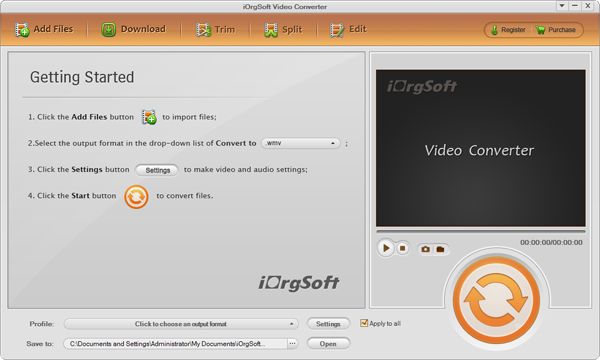
Now, it's your show time to put the converted files on your iPhone 3G.
Related Articles
- Convert Limeiwre to AVI/WMV/MPG
- Convert Limeiwre to portable device
- How to Edit 3GP Video with 3GP Editor
- An Easy Solution to Convert MPEG-2 to 3GP on Mac and Windows (Windows 8 included)
- The best converter-MKV to 3GP Converter to convert MKV files to 3GP for freely playback on 3G phone
- Mod to 3GP Converter
- 3G2 to 3GP Converter



