


Import M2TS files to Windows Movie Maker

How to import M2TS video to Windows Movie Maker on Windows 7, vista, xp
"I have a panasonic camcorder and want to edit my camcorder m2ts files, I have windows movie maker but it doesn't recognise the .m2ts extension files, any help?"
In fact, Windows Movie Maker can not support M2TS files natively, so you should convert M2TS video to WMM natively accepted formats like: AVI, WMV, MPG etc.
M2ts to Windows Movie Maker converter easily converts Sony m2ts to AVI, convert Canon m2ts to MPG, convert Panasonic m2ts to Windows Movie Maker and convert AVCHD m2ts to WMV on windows XP/Vista for Windows Movie Maker.
Secure Download
Secure Download
M2TS to Windows Movie Maker Converter also supports to input (high-definition) M2TS, MTS, TD, TRP, (QuickTime) MOV, (windows media video) ASF, (flash video files) FLV, (windows AVI video files) AVI, (real media files) RM, RMVB, (mpeg files) MP4 and (Matroska file) MKV and convert them to Windows Movie Maker compatible formats to edit movie with Windows Movie Maker for better visual effects.
Key features of m2ts to windows movie maker converter:
1.Output video formats:
WMV, AVI, 3G2, 3GP, DV, FLV, MKV, MOV, MPG, MP4, M4V, RM, RMVB, SWF etc
2.Output audio formats:
AAC, AC3, AIFF, AMR, FLAC, M4A, MKA, MP2, MP3, RA, WAV, WMA
3.Output devices:
iPod, iPad, iPhone, Creative Zen, Blackberry, Zune, Apple TV, Nexus one, Samsung Propel, Mobile phone, Wii, PSP
4.Output for editing tool:
Windows Movie Maker, Adobe premiere, Sony Vegas, Pinnacle Studio
5.Aspect ratios:
Original, full screen, 4:3, 16:9
6.Video settings:
Video encoder, bit rate, frame rate, resolution
7.Audio settings:
Audio encoder, channel, sample rate, bit rate
8.Take snapshot
Capture favored images and save as JPG, BMP and PNG
9.Rotate video files
Flip video vertically and horizontally
10.Crop
Cut off unnecessary parts
11.Clip
Split time length video files
12.Apply effects
Change saturation, contrast and brightness
Step by step import m2ts files to Windows Movie Maker:
download and install
Download m2ts to windows movie maker converter and double click .exe to install
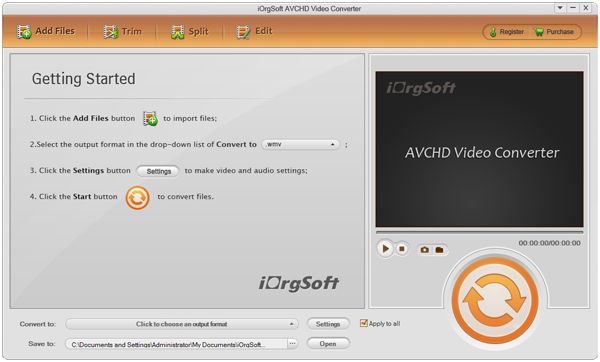
load files
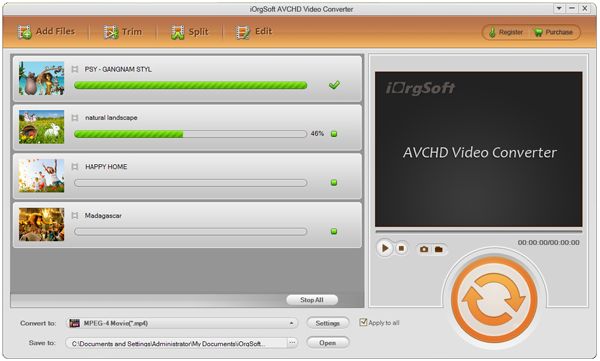
Launch m2ts to windows movie maker and click "Add File" button to import m2ts video files
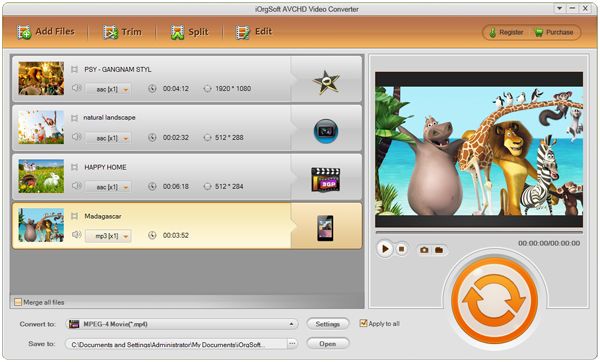
edit
Hit "Edit" or "Clip" button to do video cropping, video trimming and effects
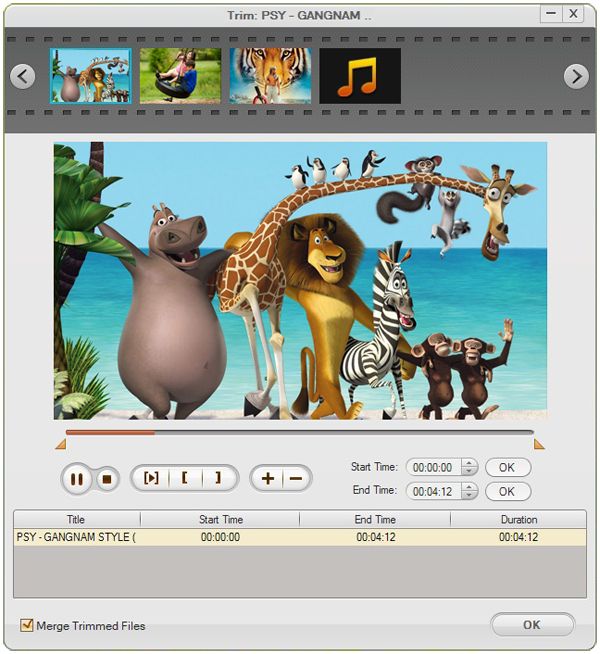
define output files
Select output video formats in the drop down list of profiles
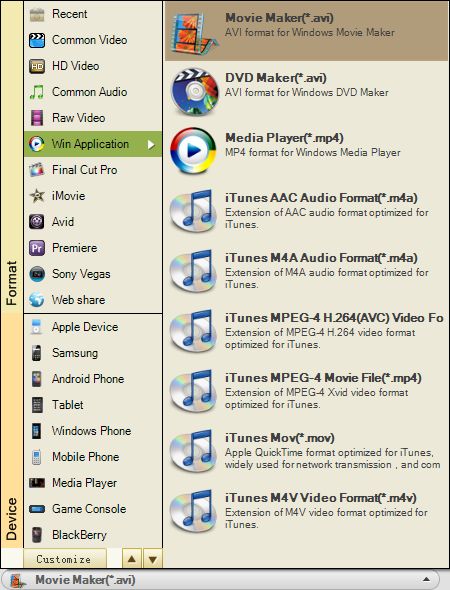
start converting
Click "Start "button to start m2ts to windows movie maker conversion on windows 7, xp, vista
Related Articles
Hot Article
- Easy import AVI to iMovie ‘08/’09/’11
- Import MTS files to iMovie 08, 09, 11
- Edit Canon C500 MXF footage in Final Cut Pro
- Import MTS to Final Cut Pro on OS X Mountain Lion
- How to Open MKV in Sony Vegas
- Convert Youtube FLV into Sony Vegas
- AVCHD to Windows Movie Maker
- Convert/import MOV file to WMM
- Convert AVCHD to to iDVD for burning
- FLV to PPT converter



