


Best Way to Convert ASF to FLV on Windows and Mac

Get some ASF videos and want to upload to YouTube to share with others? You may get frustrated if you directly to do so. As is known to us, ASF is not a friendly format to YouTube, you need to convert ASF to FLV before uploading to the Website.
To convert ASF to FLV, a professional ASF to FLV Converter is needed. Here, iOrgosft FLV Video Converter is your ideal choice, with it, you can freely convert your ASF files to FLV for uploading to YouTube, Vimeo, and other sites. In addition, this program, can also convert other videos to FLV, such as MOV, MKV, WMV, M4V, MPG, etc. besides, this program provides ultrafast converting speed and high quality output videos. Batch converting is supported, which will save your time greatly while converting.
Secure Download
Secure Download
Load ASF videos to the ASF to FLV Converter
Download and install the ASF to FLV Converter, launch it. Click "Add files" button to start import videos to the Converter, the Mac FLV Converter enables you to drag and drop your files to the program directly.
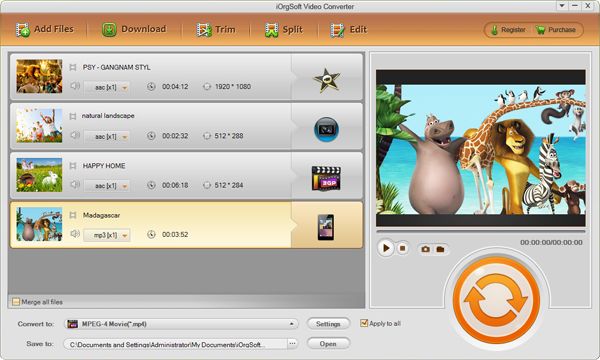
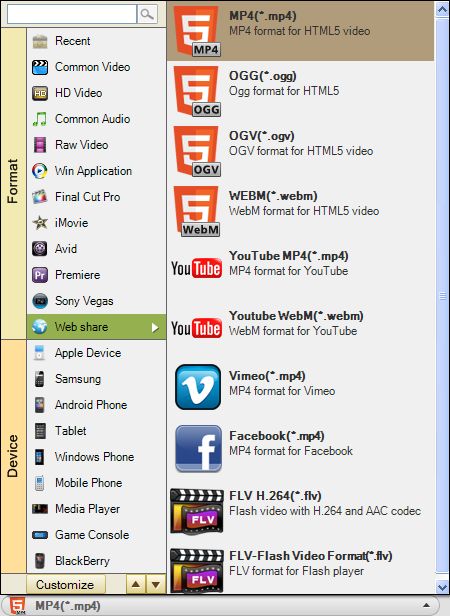
Select output format and setting
In most condition, the default output format is FLV, if not so, you need to hit the format icon to set FLV as output format; you can also convert ASF to other formats say, MP4, for playback on portable devices like iPhone 5, Samsung Galaxy S4, iPad mini, etc.
Convert ASF to FLV
Finally, when all necessary setting is done, press "Convert" button to start converting ASF videos to FLV. The smart tool will finish the rest job automatically, and when the conversion is finished, you can upload the converted files to YouTube or other sites for sharing.
Related Articles
- ASF to Video Converter
- Convert ASF to MOV
- How to Convert ASF to AAC on Mac and Windows
- How to edit FLV video files with FLV Video Editor?
- How to convert .mpg to .flv with MPEG to FLV Converter
- How to Convert Window Movie Maker Video to FLV for YouTube
- Convert JVC Everio to FLV
- Best Solution to Convert XAVC to YouTube FLV on Mac and Windows



