How to convert .mkv to .swf with MKV to SWF Converter?

How to convert .mkv video files to swf format using MKV to SWF Converter?

MKV stands for Matroska video. The Matroska Multimedia Container format is similar to .AVI and .MOV that supports several types of video compression and video codecs. MKV is intended to serve as a universal format for storing common multimedia content, like movies or TV shows. The most common use of .MKV files are used to store HD video files.

The file format SWF (acronym of "Small Web Format", pronounced swiff) a partially open repository for multimedia and especially for vector graphics, originated with FutureWave Software and has come under the control of Adobe. Intended to be small enough for publication on the web, SWF files can contain animations or applets of varying degrees of interactivity and function. SWF currently[update] functions as the dominant format for displaying "animated" vector graphics on the Web, far exceeding the use of the W3C open-standard SVG, which has met with problems over competing implementations.

Sometimes, perhaps you want to watch your MKV video on your persion PC. How to do that? MKV Converter brings you a breeze! MKV Converter, a useful application for conversion from MKV files to swf video format. It is also a MKV editor. That means you can edit your original MKV video, such as cut MKV video, crop and customize video frame size, add effects for your MKV video, etc. With MKV to SWF Converter, you can get high quality swf video, same as original file.

MKV to SWF Converter Buy Now MKV to SWF Converter Download free trial MKV to SWF Converter

Tutorial 1: Convert MKV to SWF with MKV Converter

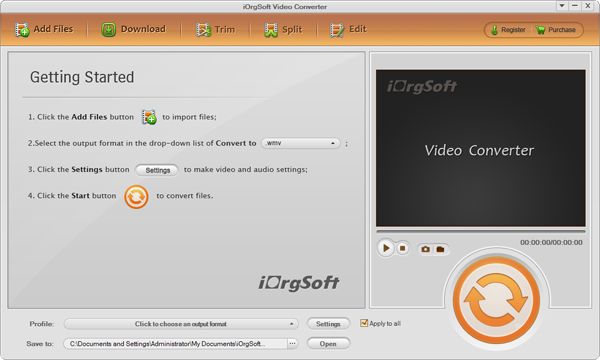
Step 1: Add your MKV file

You can add several MKV files one by one or load all MKV files from a whole folder at one time.

MKV to SWF Converter

Step 2: Set the output format

Select the output format MPEG 4 in the profile drop-down list, and specify the output directory.

MKV to SWF Converter

Step 3: Advanced settings

You can set the AVI video more accurately, including video resolution, frame rate, bit rate, and audio sample rate, channel, etc.

MKV to SWF Converter

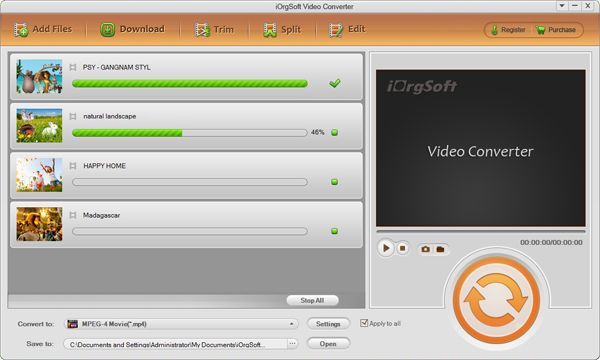
Step 4: Convert MKV to SWF

When all the necessary settings set OK, just press the "Start" button to begin converting your MKV file. MKV to SWF Converter


MKV to SWF Converter Buy Now MKV to SWF Converter Download free trial MKV to SWF Converter

Tutorial 2: Edit MKV video with MKV Converter

Click "Edit" icon, it pops up an editing dialog, which allows you to customize your personality video effects.

Tip 1: Crop MKV Movie

You can cut out the unwanted MKV video area, like black sides. Select "Full Screen" in Zoom list, tick "Custom Size" option, then you can customize video frame size according to the scale of cropped video.

MKV to SWF Converter

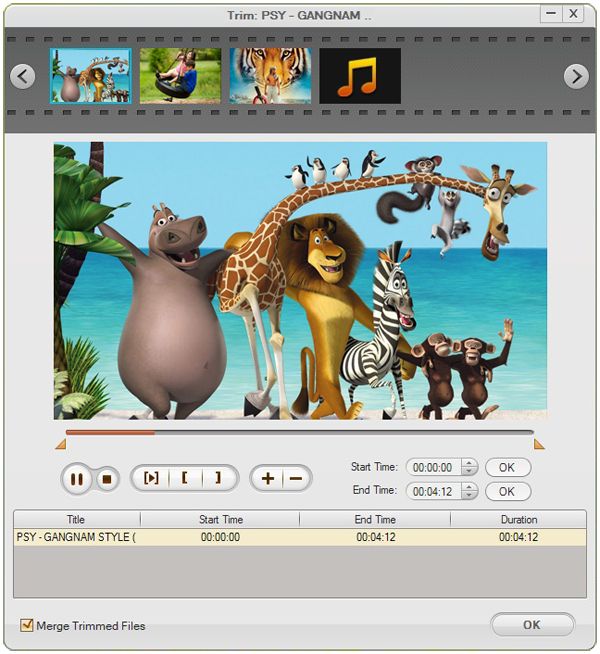
Tip 2: Cut MKV video

Convert any clips of MKV video which you like most. You can set start/end time by clicking the up and down button in the Set start/end time box and click OK.

MKV to SWF Converter

Tip 3: Adjust Video Effects

Customize your personality MKV video. Adjust video brightness, contrast, saturation, apply gray, emboss or old film effect, and set horizontal or vertical turning.

MKV to SWF Converter

Tip 4: Take snapshots of MKV Video

You are allowed to take snapshots of the playing video while previewing by click camera icon under the preview window.

MKV to SWF Converter

MKV to SWF Converter Buy Now MKV to SWF Converter Download free trial MKV to SWF Converter