


Mod to iRiver Converter

Wish to play or watch the recorded .mod videos on iRiver? MOD is the informal name of tapeless video format used by JVC, Panasonic and Canon camcorders. MOD is used exclusively for standard definition video files. Generally speaking, the .mod files use the much more common MPEG2 and MPEG-1 compression technology. However, even the Windows Media Player can’t play MOD files by default; neither can iRiver play back .mod videos.
In order to make .mod files flawlessly play on iRiver, you have to render to a third-party program-iOrgSoft MOD Video Converter. Featured with easy-to-use interface, the application easily finish the MOD to iRiver AVI or WMV conversion within several mouse clicks. Besides having optimized presets for iRiver, the MOD video conversion also has optimal pre-settings for other popular handy devices like iDevices (iPad, iPhone, iPod Touch), Zune, PSP, mobile phone and so forth. It’s a big plus. Now, free download the MOD to iRiver Video Converter and follow the steps to finish the conversion:
Secure Download
Secure Download
Load .mod file(s) to the MOD to iRiver conversion program
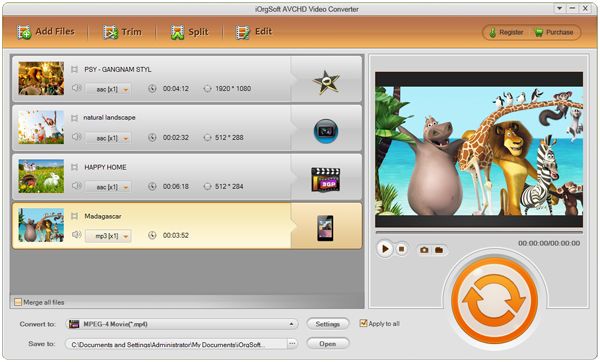
At first, backup the .mod files from camcorder to PC. Then, click "Add File" to load the .mod clips to the program.
Choose AVI as output file format
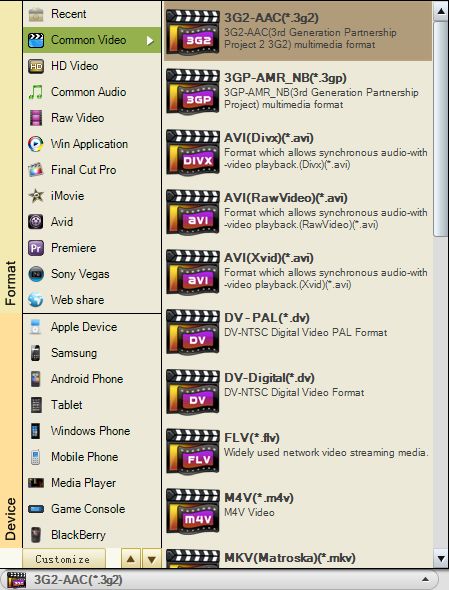
Go to drop-menu of "Profile" and choose AVI as output file format for iRiver.
Edit video (if needed)
The MOD Video Conversion application also supports you do some practical editing jobs like clip .mod files into small segments, cut off unwanted edges, adjust video effects and so on.

Start converting MOD to AVI for iRiver
At last, Click "Start" button and let the MOD to iRiver Video Converter do the rest for you! On finishing the video conversion, you can transfer the output movie to your iRiver and enjoy your time with it.



