


Convert VOB to MOV

Have a bunch of .vob files from others or homemade DVD videos. Now, you want to play VOB files in QuickTime or enjoy them on the move. To your disappointment, the VOB files can’t be recognized by QuickTime and other media player. In order to make VOB files playable, you may need to convert VOB to MOV natively supported by QT player. Handbrake can be your first choice, which is said with the ability of converting VOB to MOV. However, it may results in loss of audio or video quality, due to compression standards.
Actually, there is a better option-using iOrgSoft VOB to MOV Video Converter. It can flawlessly convert .vob to .mov files without quality loss. More than that, it supports you to customize video as easily as possible. You can trim video, crop video, add video effects and so forth. In addition, it offers some optimized settings for your Apple device like iPad, iPhone, ipod which can save you lots of time.
How to convert VOB to MOV within simple 3 steps:
Make preparation:
Free Download iOrgSoft VOB to MOV Video Converter, install and launch it.
Secure Download
Secure Download
Add .vob video files
Run the MOV Video Converter, and click "Add" button to import VOB video file. In addition, you can load several .vob files to the program at one time.
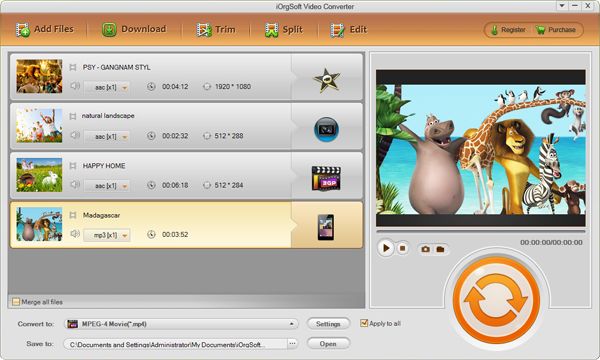
Set MOV as output file format
Under the menu of "Profile", choose "MOV" as output file format.
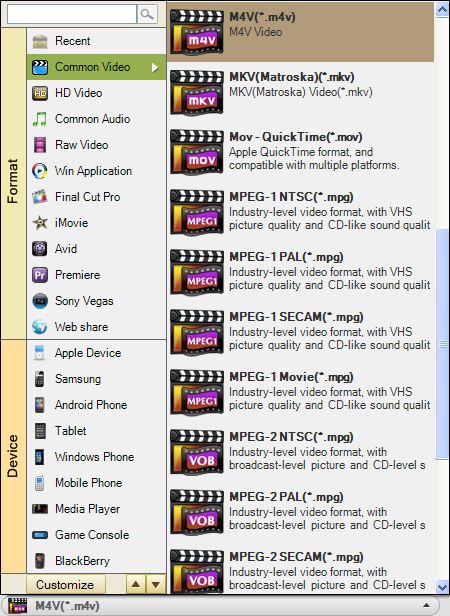
Convert VOB to MOV Video
Hit "Convert" button and let the VOB to MOV Converter do the rest for you. Supposed you don’t want to wait around during the conversion, you can set the program to automatically shut download when the conversion is done. Anyway, when the conversion is done, you can access to the generated file by default. Then, enjoy the VOB files in QuickTime or your iPad, iPod and more.
Related Articles
- VOB to Video Converter
- How to Edit VOB Files with Vob Editor on Windows OS
- VOB to AVI Converter
- How to Cut MOV Videos
- How to Edit MOV Files with MOV Editor
- Convert Flip video to .mov Quicktime
- MKV to MOV-The easiest way to make MKV files playable in QuiciTime with MKV to MOV Converter
- Convert TOD to MOV



