


Convert Flip Video files to MPG/MPEG files

How to convert flip video to mpg, mpeg, mpeg-2 for editing and playing
This article is mainly about convert flip video from flip Mino(HD), flip Ultra(HD), flip slideHD to mpg, mpeg etc, import flip video to windows movie maker, ipod, ipad, iphone, Apple tv etc and crop, clip, trim, join, split, merge flip video using Flip Video to MPG converter.
Part one: Convert and import flip video to mpg, mpeg

Flip camera always recode video in mp4 formats, only Mino 60 make mpeg-4 avi video, these formats are not standar or easily to accepted by various multimedia device.
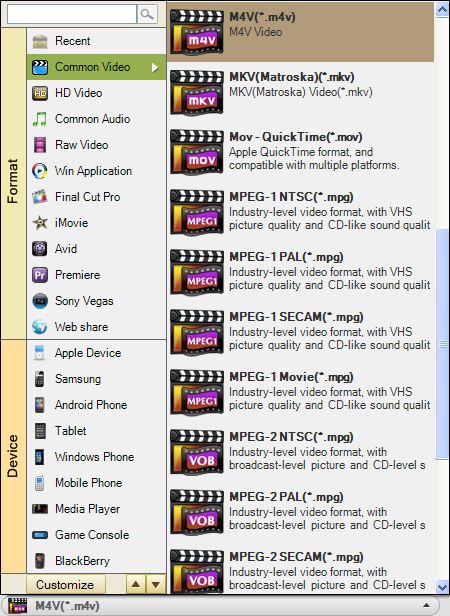
Flip Video to MPG Converter supports convert any flip video to mpg, mpeg; flip video to mpeg-1 ntsc/pal/secam , mpeg-2 and mpeg-2 ntsc/pal/secam; flip mp4 video to AVC mpeg-4 H.264, MPEG-4 xvid with high compress rate; flip mpeg-4 avi video to mpg, mpeg by just three simple but useful steps.
Secure Download
Secure Download
Download "Flip Video to MPG Converter" and run it.(Free trial allowed)
Add Files, Set output and save to destination place (refer to picture)
Start conversion
click "Start" to convert flip video to mpeg/mpg with broadcast-level picture quality and CD-like sound quality.
Part two: More about flip video to mpg software
Flip Video to MPG converting tool also supports convert flip video to wmv, avi, flv, mov, dv, 3gp, mkv, 3g2, swf, m4v, rm, rmvb, xvid, divx etc and import flip video to Windows movie maker, sony vegas, iPod, iPad, iPhone, Blackberry, Zune, Creative Zen, Gphone, iRiver, Mobile Phone, Apple tv, PSP, PS3, Adobe premiere etc without downloading any more codecs.
Magic Flip Video to MPG Converter, the best Video Converter, can extract audio from video and save as AAC, AC3, AMR, M4A, MKA, MP3/MP2, RA, WAV, WMA, AIFF, FLAC and import flip video and audio to iTunes, Quicktime, upload to Youtube, Myspace, Google and Yahoo video ect.
Part three: Edit flip video using flip video to mpg converter
As a versatile video software, flip video to mpg program can edit any flip video through merge, join, crop, apply effect, trim, clip, Output parameter settings, Snapshot/Rotate etc.
Trim/clip: Set starting time and ending time, split your video to several parts.
Crop: set aspect ratio, original, 16:9, 4:3, full screen etc
Output parameter settings: adjust resolution, Frame Rate, Encoder and Bitrate
Effect: Adjust brightness, contrast, and saturation; special effect: original, gray, emboss, old film etc.
Merge, Snapshot and Rotate: merge several AVCHD files into one, snapshot pictures and save as jpeg, jpg, bmp, png, rotate video vertical and horizontal
Secure Download
Secure Download
Related Articles
Hot Article
- Useful AVCHD to MP4 Converter Simply Convert AVCHD to MP4
- How to Edit MTS Files with MTS Editor
- XAVC Converter for Mac
- Convert MXF files on Mac
- MTS to DVD maker for mac lion
- How to Convert XAVC to MP4 on Windows and Mac OS X
- Import MTS to Final Cut Pro on OS X Mountain Lion
- Import MTS files to iMovie 08, 09, 11
- Convert MXF to DVD Mac



