How to convert JVC Everio TOD to 3GP on Mac?
Note: This version is for Mac OS. If you are using Windows™, please click here.
Something you need to know about 3GP files.
3GP is a multimedia container format defined by the Third Generation Partnership Project used on 3G mobile phones but can also be used on some 4G and 2G mobile phones. 3GP file stores video streams as MPEG-4 Part 2 or H.263 or MPEG-4 Part 10 (AVC/H.264), and audio streams as AMR-NB, AMR-WB, AMR-WB+, AAC-LC or HE-AAC.
Why you need to convert JVC Everio TOD to 3GP?
You capture a lot of amazing videos with your newly JVC Everio camera and want to put them onto your portable mobile phone or iPhone 3G so that you can enjoy them anytime and anywhere. However, the truth is that TOD videos by JVC Everio camera cannot be recognized by phones.
What you can do with TOD to 3GP Mac converter?
TOD to 3GP converter for Mac is special converting tools to convert JVC Everio TOD video files to 3GP for various mobile phones. It can manage all popular formats like MOD, TOD, MTS, TP, M2TS, AVCHD, WMV, MKV, MP4, AVI, FLV, SWF, RM and DV and enjoy common formats on portable iPod, iPhone, PSP, Apple TV, Creative Zen, Zune, Creative Wii, Gphone and mobiles.
Mac TOD to 3GP converting tool is great editor which helps you to crop, trim, add effects, merge files and rotate videos. You can take a snapshot with the built-in camera and save them as JPG, BMP, PNG formats. By the way, you can adjust some advanced setting to better your views like video resolution, frame rate, bitrate and encoder.
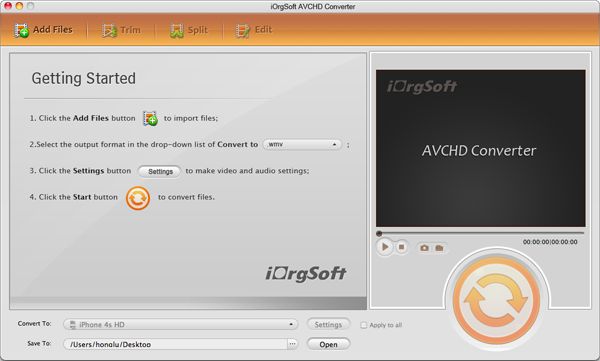
Step 1. Download and install Tod to 3GP Converter for Mac
You are going to have a trial version or unregisteration version of tod to 3gp converter for Mac. but there is no difference between trial and standard regarding it performance and functions

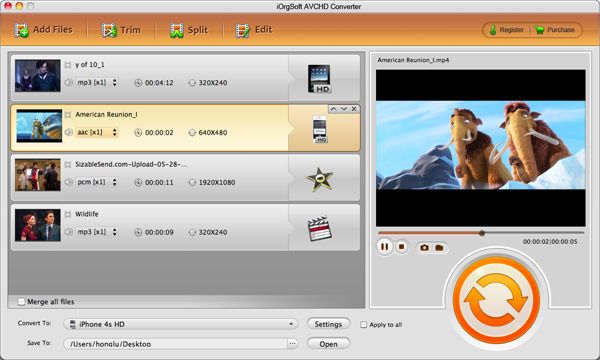
step 2 Run tod to 3gp converter for mac and load video file
make sure the version you are using is the latest one. to select a tod video or other video files, please hit Add File... button. you are encourged to load as many video file as you can.
Step 3 Video Editing
this step tells you many ways to edit your vidoe file.
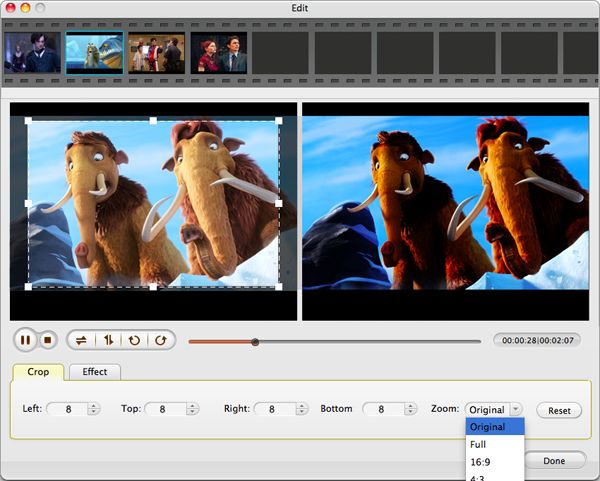
a. video crop
this is for cuttting out the unwanted part or black sides in the frame. just put in the numbers in the box. it will decide which part need cropped.

b. video trimming
this is for the size of the output video. usually different media player requires different input video size. using trim will be easier for this.

c. effect selection
you can use saturation, contrast, brightness to adjust the vidoe effect. Special effects is also availble like Gray, old file, horizontal...

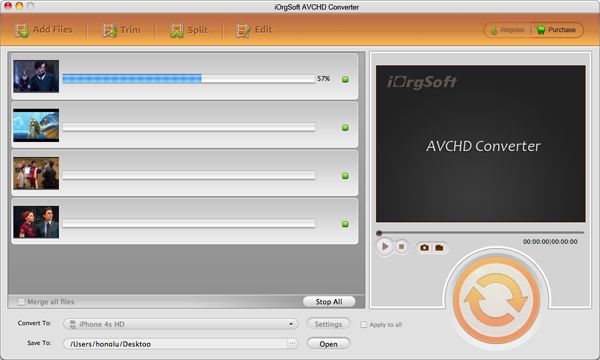
Step 4. conversion
press start button, the program will run immediately and the file will be converted.
The known camcorder models that use the .Tod format are
2007: GZ-HD7 (HDD, SD/SDHC card), GZ-HD3 (HDD, SD/SDHC card)
March 2008: GZ-HD5 (HDD, MicroSDHC card), GZ-HD6 (HDD, MicroSDHC card)
June 2008: GZ-HD30, GZ-HD40 (HDD, MicroSDHC card, dual TOD and AVCHD recording)
Next article : How to convert MOD to MP4 on Mac OS?
Related articles:
Something you need to know about 3GP files.
3GP is a multimedia container format defined by the Third Generation Partnership Project used on 3G mobile phones but can also be used on some 4G and 2G mobile phones. 3GP file stores video streams as MPEG-4 Part 2 or H.263 or MPEG-4 Part 10 (AVC/H.264), and audio streams as AMR-NB, AMR-WB, AMR-WB+, AAC-LC or HE-AAC.
Why you need to convert JVC Everio TOD to 3GP?
You capture a lot of amazing videos with your newly JVC Everio camera and want to put them onto your portable mobile phone or iPhone 3G so that you can enjoy them anytime and anywhere. However, the truth is that TOD videos by JVC Everio camera cannot be recognized by phones.
What you can do with TOD to 3GP Mac converter?
TOD to 3GP converter for Mac is special converting tools to convert JVC Everio TOD video files to 3GP for various mobile phones. It can manage all popular formats like MOD, TOD, MTS, TP, M2TS, AVCHD, WMV, MKV, MP4, AVI, FLV, SWF, RM and DV and enjoy common formats on portable iPod, iPhone, PSP, Apple TV, Creative Zen, Zune, Creative Wii, Gphone and mobiles.
Mac TOD to 3GP converting tool is great editor which helps you to crop, trim, add effects, merge files and rotate videos. You can take a snapshot with the built-in camera and save them as JPG, BMP, PNG formats. By the way, you can adjust some advanced setting to better your views like video resolution, frame rate, bitrate and encoder.
Step 1. Download and install Tod to 3GP Converter for Mac
You are going to have a trial version or unregisteration version of tod to 3gp converter for Mac. but there is no difference between trial and standard regarding it performance and functions

step 2 Run tod to 3gp converter for mac and load video file
make sure the version you are using is the latest one. to select a tod video or other video files, please hit Add File... button. you are encourged to load as many video file as you can.
Step 3 Video Editing
this step tells you many ways to edit your vidoe file.
a. video crop
this is for cuttting out the unwanted part or black sides in the frame. just put in the numbers in the box. it will decide which part need cropped.

b. video trimming
this is for the size of the output video. usually different media player requires different input video size. using trim will be easier for this.

c. effect selection
you can use saturation, contrast, brightness to adjust the vidoe effect. Special effects is also availble like Gray, old file, horizontal...

Step 4. conversion
press start button, the program will run immediately and the file will be converted.
The known camcorder models that use the .Tod format are
2007: GZ-HD7 (HDD, SD/SDHC card), GZ-HD3 (HDD, SD/SDHC card)
March 2008: GZ-HD5 (HDD, MicroSDHC card), GZ-HD6 (HDD, MicroSDHC card)
June 2008: GZ-HD30, GZ-HD40 (HDD, MicroSDHC card, dual TOD and AVCHD recording)
Next article : How to convert MOD to MP4 on Mac OS?
Related articles:
- How to Convert MTS Video to MP4 for Mac?
- How to import mpg (mpeg-1, 2, 3, 4) file into FCP(Final Cut Pro)?
- How to convert flip video to flv from flip video camcorder?
- How to convert rmvb to amv on mac?
- How to play/convert rmvb file on smart phone/cell phone/mobile phone?
- How to convert MTS to DV on Mac using MTS to DV for Mac OS X/Snow Leopard?

Movie Converter for Mac