


Convert Tod to FCP on Mac Guide

How to transfer JVC Camcorder TOD video to Final Cut Pro (FCP)?
TOD video file is captured by JVC Everio video camcorders, such as the GZ-HD3 and GZ-HD7. Many Mac users found it is impossible to transfer TOD files into Final Cut Pro for editing. That is because Final Cut Pro only supports MOV, DV and MPEG-4 formats and cannot recognize TOD. With JVC Camcorder TOD file to Final Cut Pro (FCP) converter, this problem can be fixed easily.
Camcorder TOD video to Final Cut Pro (FCP) converter is a powerful converter that can convert Camcorder TOD files to MOV, DV, MPEG4 format for editing with Final Cut Pro, Final Cut Express. It provides you a great quality and blazing high speed.
Secure Download
Secure Download
With Camcorder TOD to FCP converter, you can feel free to enjoy its brilliant edit features like tweaking video Brightness, Contrast, Saturation in effect panel; removing the screen black boarder and unwanted part in cropping panel; customizing time-length playing segment in trimming panel. What's more, you can capture your favorite images during preview with built-in camera.
Anyway, it is absolutely worth trying.
Download and install converter
Transfer videos to Mac and Import TOD files
Connect your camcorder with USB cable and transfer the videos you need to convert to Mac. Run the converter and hit Add button to import TOD files.
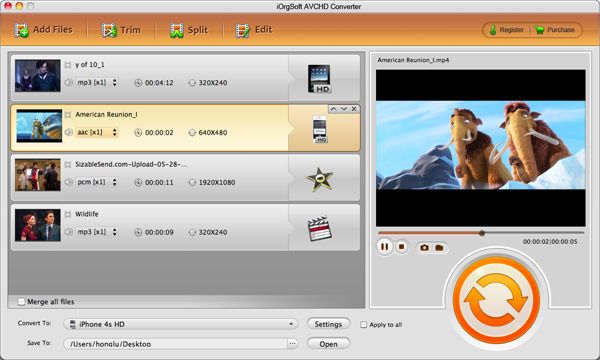
Define playing region
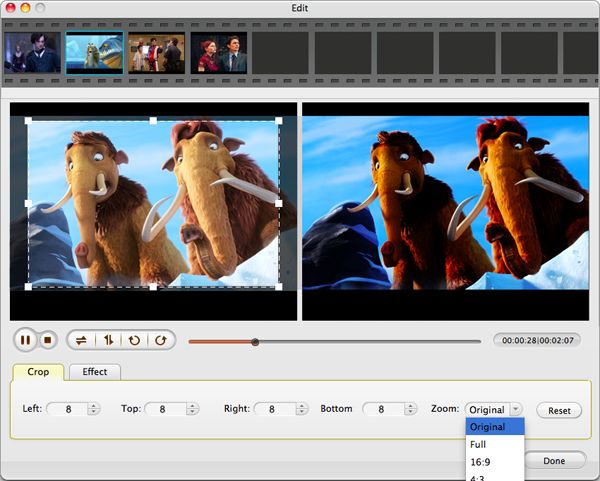
Hit Edit button and you will see two preview screens, one for Original Preview, and another for Output Preview. Hit the Crop button and set the parameters on the boxes: Left, Top, Right and Bottom. Then the screen will specify to your preferred playing area.
Select output format and advanced setting
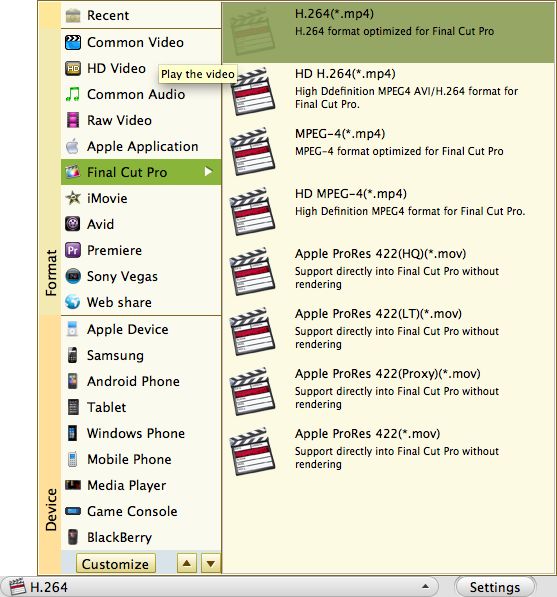
In the profile drop-down menu, select FCP compatible formats. Hit Setting button to adjust more advanced settings like Resolution, Bit rate and Encode.
Conversion
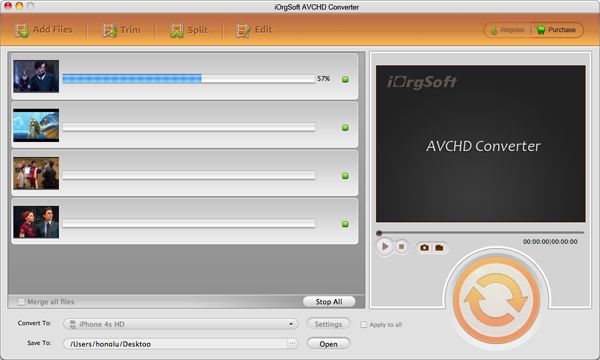
Hit Convert button to start conversion. Tick "Open output folder when conversion finished" and the output folder will open immediately after conversion completes.
Related Articles
- TOD Cropper for Mac
- Edit TOD on Mac OS
- Tips For Converting TOD Videos to iPad on Mac
- Easiest Solution to Convert Canon XA10 AVCHD to Final Cut Pro X/7/6
- Import Canon EOS 5D MOV to FCP7/X
- How to Import Sony XAVC to Final Cut Pro 7/6
- The Easiest Way to Import M2T videos to FCP
- Import Flip Video into FCP
Hot Article
- Easy import AVI to iMovie ‘08/’09/’11
- Import MTS files to iMovie 08, 09, 11
- Edit Canon C500 MXF footage in Final Cut Pro
- Import MTS to Final Cut Pro on OS X Mountain Lion
- How to Open MKV in Sony Vegas
- Convert Youtube FLV into Sony Vegas
- AVCHD to Windows Movie Maker
- Convert/import MOV file to WMM
- Convert AVCHD to to iDVD for burning
- FLV to PPT converter



