How to convert DVD Video .vob to Mobile Phone .3gp on Mac?
What is vob?
Movie data file from a DVD disc, typically stored in the VIDEO_TS folder; contains the majority of data stored on the disc including video, audio, and subtitles; usually formatted as an MPEG-2 system stream and can be opened by various video playback programs. A VOB file (Video Object) is a container format in DVD-Video media. VOB is based on MPEG-2 program stream format, but with additional limitations and specifications in the private streams.[1][2] It contains the actual Video, Audio, Subtitle, and Menu contents in stream form. Other DVD files include IFO and BUP files.
What is 3gp?
3GP (3GPP file format) is a multimedia container format defined by the Third Generation Partnership Project (3GPP) for 3G UMTS multimedia services. It is used on 3G mobile phones but can also be played on some 2G and 4G phones. Audio and video container format developed by the 3rd Generation Partnership Project (3GPP); designed as a multimedia format for transmitting audio and video files between 3G cell phones and over the Internet; commonly used by mobile phones that support video capture.
The best VOB to 3GP Converter for Mac can take care of all your video/audio conversion problems on Mac OS X, especially best at converting VOB files to 3GP for play back on mobile phone for users whose computer is running either on Intel processor or PowerPC. VOB to 3gp converter for Mac is popular for its user friendly interface and simple yet powerful video editing functions, such as crop and trim videos , preview videos, merge video files, batch mode, brightness, contrast and saturation. VOB to 3GP Converter for Mac is your best choice.
Now, let's get to the detailed, step-by-step tutorial on how to use 3gp converter for Mac to make videos and audio for mobile phone:
Step 1 We assume you already have 3gp converter for Mac (V3.3.8) installed on your Mac. If not, please download it from www.iorgsoft.com and install it.
Please don’t worry whether the program would be compatible with your computer or not, with the capacity to run on both Intel processor and PowerPC it will eliminate the incapability issue.
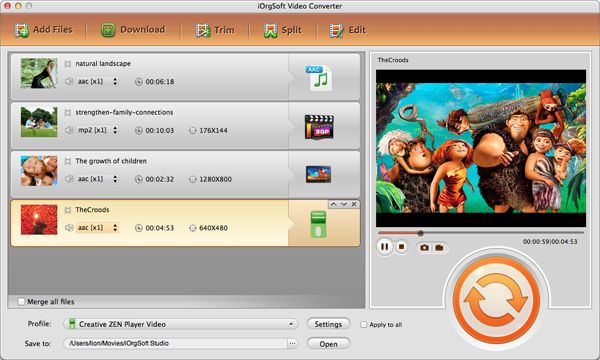
Step 2 Hit Add File to load video info.
This would open a window, browse for the video files you wish to convert. Select the files and click the Open button. The program supports batch mode, so please feel free to load as many as you wish.

Note: video and audio files are both supported.
Step 3 Convert video
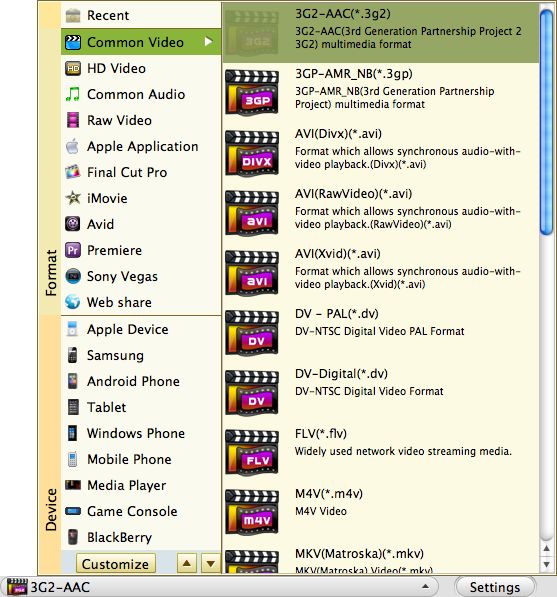
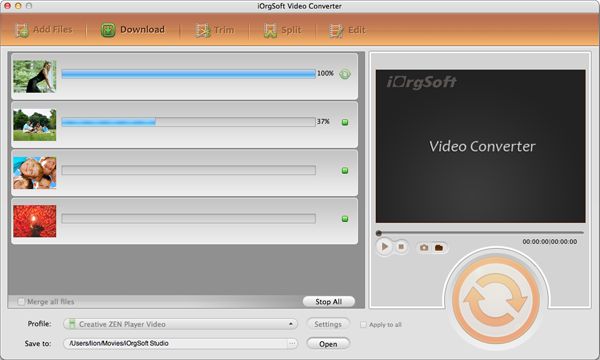
Please appoint 3gp or others as output format for the video needed to convert, you can do this in the pull down list of Profile. You also need to select the output path in the Output drop down list. After the conversion, click open will show you where the converted file located.

Optional step
Step 4 There are many optional choices can make your video look more personalized, such as add Effect, Crop out unwanted part in the frame, trim video, capture screenshot in the frame.
Want to crop out the black sides in the frame? Well after you load the video, click Crop…this opens a window for you to tweak the numbers to decide how much area you want to leave out. You can put in specific numbers like it shows below:

Movie data file from a DVD disc, typically stored in the VIDEO_TS folder; contains the majority of data stored on the disc including video, audio, and subtitles; usually formatted as an MPEG-2 system stream and can be opened by various video playback programs. A VOB file (Video Object) is a container format in DVD-Video media. VOB is based on MPEG-2 program stream format, but with additional limitations and specifications in the private streams.[1][2] It contains the actual Video, Audio, Subtitle, and Menu contents in stream form. Other DVD files include IFO and BUP files.
What is 3gp?
3GP (3GPP file format) is a multimedia container format defined by the Third Generation Partnership Project (3GPP) for 3G UMTS multimedia services. It is used on 3G mobile phones but can also be played on some 2G and 4G phones. Audio and video container format developed by the 3rd Generation Partnership Project (3GPP); designed as a multimedia format for transmitting audio and video files between 3G cell phones and over the Internet; commonly used by mobile phones that support video capture.
The best VOB to 3GP Converter for Mac can take care of all your video/audio conversion problems on Mac OS X, especially best at converting VOB files to 3GP for play back on mobile phone for users whose computer is running either on Intel processor or PowerPC. VOB to 3gp converter for Mac is popular for its user friendly interface and simple yet powerful video editing functions, such as crop and trim videos , preview videos, merge video files, batch mode, brightness, contrast and saturation. VOB to 3GP Converter for Mac is your best choice.
Now, let's get to the detailed, step-by-step tutorial on how to use 3gp converter for Mac to make videos and audio for mobile phone:
Step 1 We assume you already have 3gp converter for Mac (V3.3.8) installed on your Mac. If not, please download it from www.iorgsoft.com and install it.
Please don’t worry whether the program would be compatible with your computer or not, with the capacity to run on both Intel processor and PowerPC it will eliminate the incapability issue.
Step 2 Hit Add File to load video info.
This would open a window, browse for the video files you wish to convert. Select the files and click the Open button. The program supports batch mode, so please feel free to load as many as you wish.

Note: video and audio files are both supported.
Step 3 Convert video
Please appoint 3gp or others as output format for the video needed to convert, you can do this in the pull down list of Profile. You also need to select the output path in the Output drop down list. After the conversion, click open will show you where the converted file located.

Optional step
Step 4 There are many optional choices can make your video look more personalized, such as add Effect, Crop out unwanted part in the frame, trim video, capture screenshot in the frame.
Want to crop out the black sides in the frame? Well after you load the video, click Crop…this opens a window for you to tweak the numbers to decide how much area you want to leave out. You can put in specific numbers like it shows below:

Related tutorials: How to convert avi, flv, asf, wmv, 3gp, 3g2, mov, vob, mpg, mp4, mkv, m4v, dv to 3g2, 3gp, mov, mpg, mp4 on Mac OS X?

Movie Converter for Mac