


How to Join MOV Videos

How to Join MOV Videos with MOV Video Joiner
Today, people are enjoying many kinds of entertainments in their daily life. Watching video films is one of that. MOV is a popular video format among all videos people enjoying. However, sometimes these MOV videos are not as satisfying as expected for many reasons. For example, maybe you want to mix two or more MOV videos together? Well, how do you fix that? Have you thought about editing these MOV videos yourself?
iOrgsoft Video Joiner is of great power to help merging MOV videos for individual use. This video editor can handle almost all kinds of formats like MP4/AVI/3PG/MOV, etc. perfectly and meanwhile is easy-to-use.
Download iOrgsoft MOV Merger and install it, then step by step mixing the MOV videos:
Secure Download
Secure Download
Add MOV Videos
Run the program and import MOV videos from your disk by clicking "Add videos" icon, then drag and drop them onto the video area in the Timeline. Several clips are supported to be added in one time.
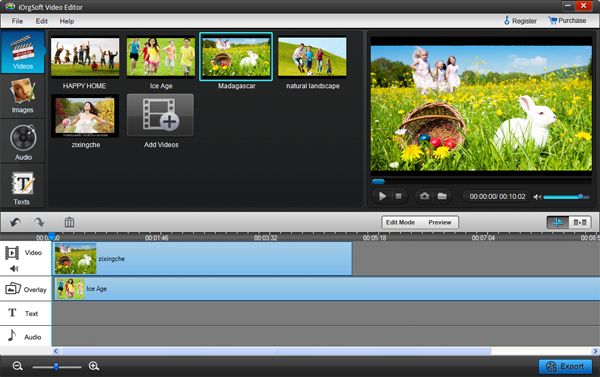
Join and merge MOV Files
Drag the added MOV videos onto the video area in the Timeline one by one. Click "preview", and you can see that these videos are now playing as a single video seamless.
Add transition (optional): default operation will add nothing to your video, but if you want to add transitions, just click "add transition" and drag the slider to choose the transition effects, and then add them onto the timeline between 2 video files.
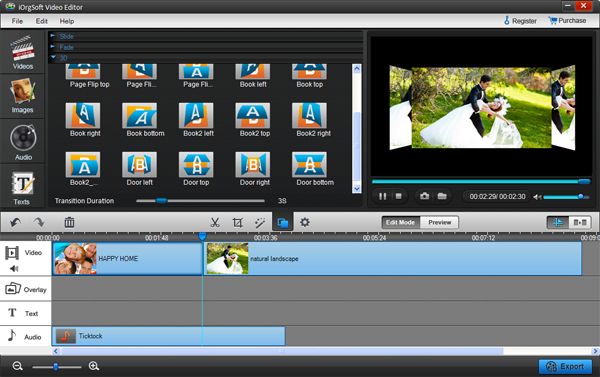
Export Edited MOV Videos
Click "Preview" to see if the edited video needs another adjustment before exporting it. After that, click "Export" button and choose the format as you preferred to mix the MOV files together.
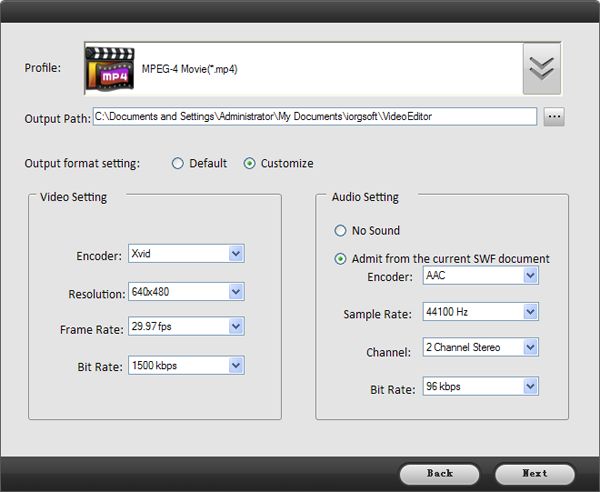
Related Articles
Related Product

$39.99
Offers many handy editing tools to make your video look both professional and interesting.



$35.00
Simple tool to convert MOV videos to different formats and different devices, or programs.
Hot Article
- AVI to MP4
- MTS to MP4
- SWF to MP4
- AVI to MOV
- MTS to MOV
- SWF to MOV
- MKV to AVI
- FLV to MP4
- MKV to MP4
- AVI to FLV



