

Sometimes when we encounter a file in .rm file extension and try to play it as we usually do to other file, in most case, it just can't play. rm requires a specific player that made for them. And what's worse, rm is not an open enough file that can't directly be edited by most video editing suites and it is hard to get them onto portable devices either.
Rm converter provides you an ultimate solution to let you view .rm file with almost all popular media players. Its magic lies in the powerful codec pack that included in the rm converter. Rm converter enables to convert rm to any other popular video/audio format like avi, mpg, mp4, flv, wmv, mov, mp3, etc.
Rm converter lets you enjoy rm file in more ways, you can put your favorite rm video onto your portable media device like iPhone, iPod, Blackberry, Creative Zen. The video editing within will make your project more successful.
Secure Download
Secure Download
You will download a 3.3.8 version rm converter either for you to evaluate as a trial or as a full version after you purchase it, if you have problem register, please contact us for an official version link address.
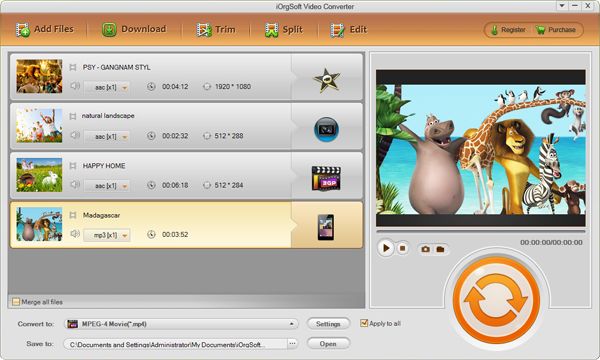
Click Add...button to load rm/rmvb file. The batch mode enables you to import as many as rm file as possible. You can also preview the file with the little screen on the right panel.
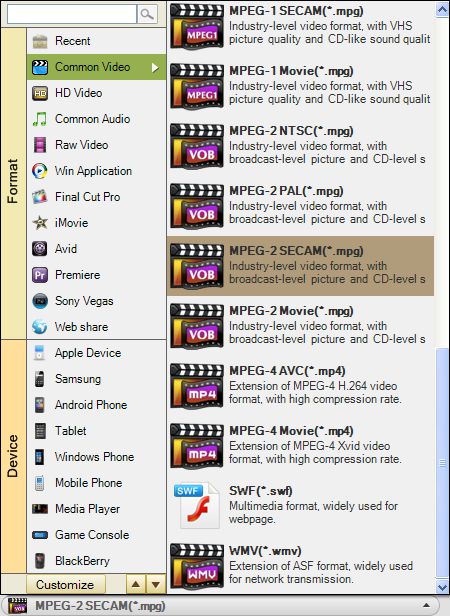
Rm converter supports in various output video/audio formats. You can check the Profile...drop down list to find your desired one.
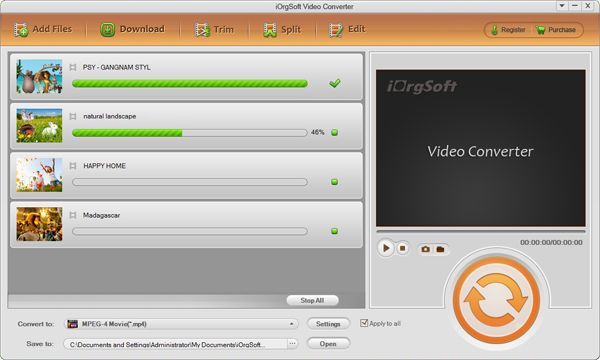
Now you are ready to convert the rm/rmvb file. The entire list of video will be converted to the preset output format. Hit Start...button to begin converting. The progress bar will show you the conversion status in real time.
Related tutorials:
How to convert RM (Real Media) to MOV/MPG/MPEG/MP4/M4V/DV/3GP/FLV/SWF/MP3/WAV/AAC on Mac OS X?
$99.00 $69.99
No quality loss conversion from SWF files to any other common video formats with fast speed.


$39.95
Make DVDs from common videos in formats like mp4, wmv, mkv, mov etc to DVD fast and easily.
$35.00
Convert nearly any SD and HD video format to popular video formats with zero quality loss.




Terms & Conditions| Privacy| Sitemap| Contact Us| About Us| Affiliate| Newsletter| License Agreement| Uninstall
Browser compatibility : IE/Firefox/Chrome/Opera/Safari/Maxthon/Netscape
Copyright © 2007-2016 iOrgsoft Studio All Rights Reserved