


MOD to Adobe Premiere Covnerter

How to get annoying JVC Everio .MOD files into Premiere?
Adobe Premiere Pro is a professional, real-time, timeline based video editing software application.
However, for a variety of reasons, importing uncommon MOD files from JVC Everio camcorders(and also Canon,Sony HD,Panasonic)into Adobe Premiere Pro proved to be a challenging experience.
Question1: I have JVC Everio camcorder which records standard-definition video as MOD files, I have recently found out that adobe premiere pro CS4 does not support this type of file and that i have to transcode it first. I have no idea how to do this, can anyone help?
Question2: I have JVC Everio GZ-MG57 which produces MOD files that I'd like to import them to Adobe Premiere pro for editing, but it is impossible.
This is a problem often with JVC camcorders (store in MOD). Apparently the MOD video files are standard definition "modified" MPEG2 video and need to be converted-transcoded-before Adobe Premiere pro cs4 can deal with them.
Changing the file name suffix is only a hybrid solution. It just tricks Adobe Premiere pro cs4 into accepting the files. There are still codec and conversion issues.
Converting/Transcoding jvc everio MOD files to import to adobe premiere pro cs4/elements?
The best solution is to truly convert the mod files -- using iOrgSoft Mod to Adobe Premiere Pro Converter I recommend. As Premiere Pro is compatible with AVI and MPEG, this converter will definitely help you convert MOD to AVI(Adobe Premiere pro cs4/elements sometimes does not like mpgs),convert MOD to MPG, convert MOD to MPEG.
Features of this Mod to Adobe Premiere pro Converter
Mod to Adobe Premiere pro Converter provides the total solution of converting JVC Everio mod files, it is an all-in-one media converter software that convert MOD to AVI,MPEG,WMV,MKV, MPG, MP4, VOB, MOV, SWF, 3GP, RM that can be imported into Adobe Premiere Pro, Windows Movie Maker, Sony Vegas, sent via email, posted on YouTube or played with portable devices like iRiver, BlackBerry, Gphone, iPod, iPhone, PSP etc. Besides converting between video formats, it can also extract audio from videos and save as MP3, AAC, AC3, AIFF, WMA, WAV etc.
Secure Download
Secure Download
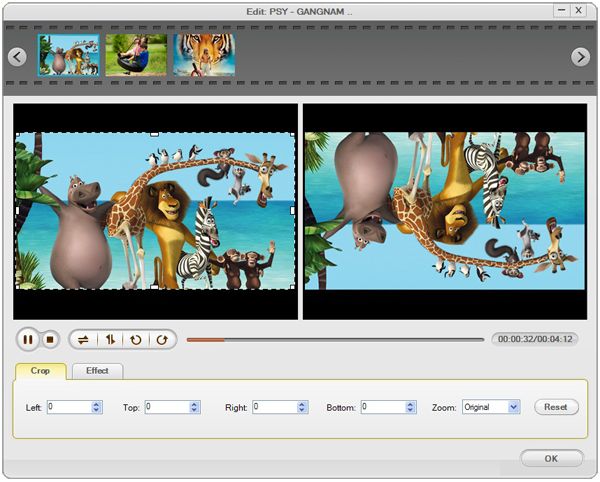
Mod to Adobe Premiere Pro Converter also offers many editing functions, with it, you can preview your video,take snapshots of your video,cut MOD files, trim MOD files, crop unwanted black bars off mod videos, add artistical effects like Gray, Emboss or Old film to .mod files, split MOD files into smaller sections or merge/join/combine several MOD clips into a single one.
When you have converted the mod files to avi,mpeg, they are in right formats to import into Adobe Premiere Pro/elements.
Converting MOD files in Adobe Premiere Pro cs4/elements
With Mod to Adobe Premiere Pro Converter,you can
convert JVC Everio GZ-MG30 Mod file to Adobe Premiere Pro cs4/elements
convert JVC Everio GZ-MG70 Mod file to Adobe Premiere Pro cs4/elements
convert JVC Everio GZ-MG37 Mod file to Adobe Premiere Pro cs4/elements
convert JVC Everio GZ-MG77 Mod file to Adobe Premiere Pro cs4/elements
convert JVC Everio GZ-MG505 Mod file to Adobe Premiere Pro cs4/element
convert JVC Everio GZ-MG130 Mod file to Adobe Premiere Pro cs4/elements
convert JVC Everio GZ-MG155 Mod file to Adobe Premiere Pro cs4/elements
convert JVC Everio GZ-MG255 Mod file to Adobe Premiere Pro cs4/elements
convert JVC Everio GZ-MG555 Mod file to Adobe Premiere Pro cs4/elements.
Step by Step how to convert/import mod to Adobe Premiere Pro on windows.
Free download and install Mod to Adobe Premiere Pro Converter
Load MOD Video files into Mod to Adobe Premiere Pro Converter
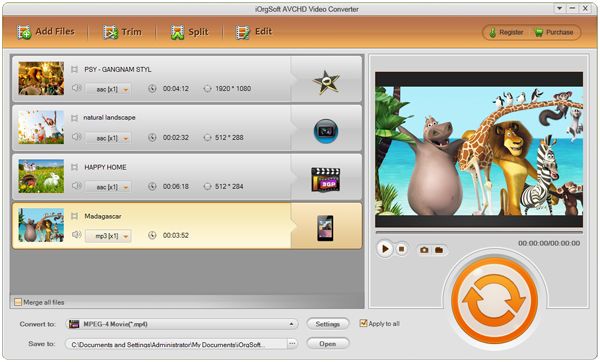
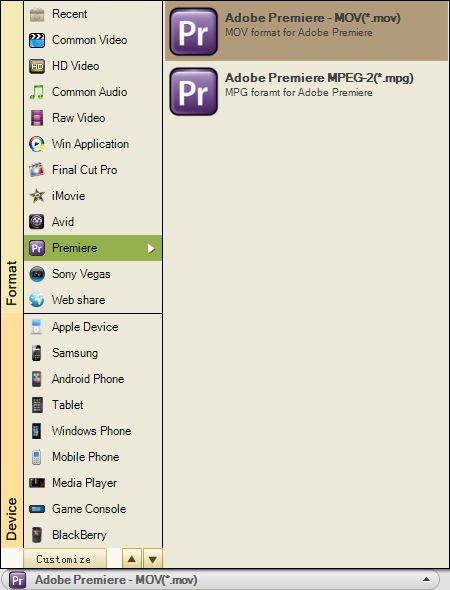
Set the output format to AVI and define the output location
Edit/Cut/Crop/Trim .mod file
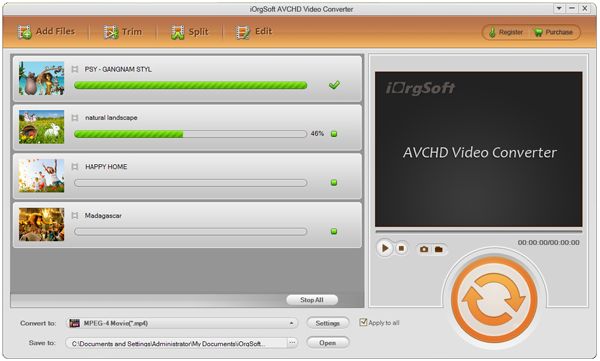
Start converting mod files to Adobe Premiere Pro accepted avi/mpeg.
Related Articles
- Convert MOD to AVI, WMV, MPG
- Convert Panasonic SDR-S26 mod file
- Convert mod file to Roxio Creator 2010
- An Easy Way to Convert and Import AVCHD to Adobe Premiere Pro
- Easy Way to Import PVR Videos to Adobe Premiere Pro
- Convert TOD for adobe premiere pro
- How to Import MP4 to Adobe Premiere Pro CS3/ CS4/ CS5/CS6/CC
- Import Flip video to Adobe Premiere
Hot Article
- Easy import AVI to iMovie ‘08/’09/’11
- Import MTS files to iMovie 08, 09, 11
- Edit Canon C500 MXF footage in Final Cut Pro
- Import MTS to Final Cut Pro on OS X Mountain Lion
- How to Open MKV in Sony Vegas
- Convert Youtube FLV into Sony Vegas
- AVCHD to Windows Movie Maker
- Convert/import MOV file to WMM
- Convert AVCHD to to iDVD for burning
- FLV to PPT converter



