


Convert Youtube FLV into Sony Vegas

How to Convert YouTube FLV to Sony Vegas
"I have download some FLV videos from YouTube.com and intend to edit them in Sony Vegas, but tried several times, the FLV files just could not be recognized, so what should I do before I can edit FLV in Sony Vegas?"
It is a common issue for those who love collecting YouTube FLV videos as well as videos from Google video, Myspace, Vimeo, Break,Megavideo and so on . As is known to us, Sony Vegas is powerful video editing software, and to edit videos in Windows, this program is one of the best choices. But it does not support FLV natively, so, if you want to edit FLV in Sony Vegas, you need to convert them to AVI or WMV that is well supported by SV. To do the job, you just need a FLV to Sony Vegas Converter to help you. Free download iOrgsoft FLV to Sony Vegas Converter; follow the guide below, you will be able to easily import FLV to Sony Vegas after several clicks.
Secure Download
Secure Download
Guide on How to import FLV to Sony Vegas
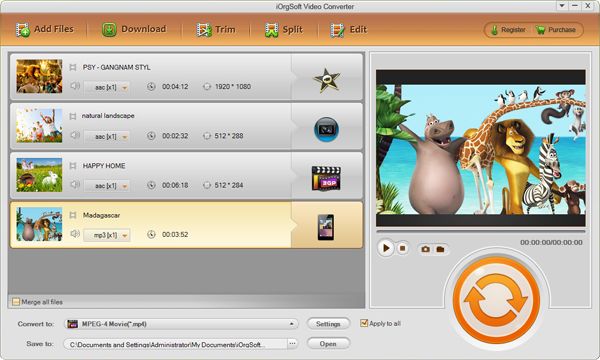
Add FLV
Click Add File button to browser the FLV videos files in your computer, select the files you want to convert to Sony Vegas, then they will appear on the program.
This FLV to Sony Vegas Converter allows batch convert videos so you can load several files to the program and convert them at one time.
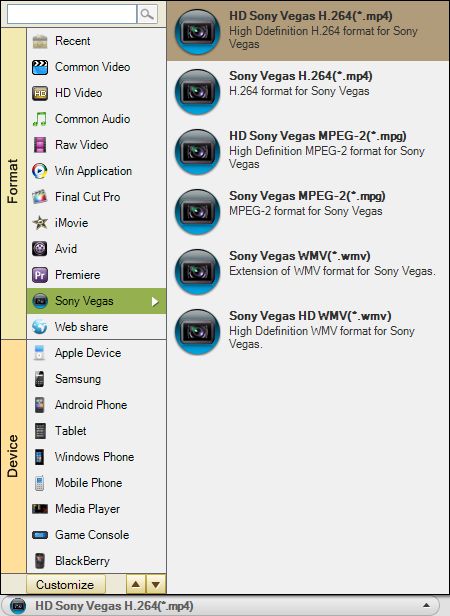
Set output format and path
Click format button, you will see the format window pop up, then click Application choose output format as Sony Vegas format ("Application > Sony Vegas"); then set an output path from options of Output.
Convert FLV to Sony Vegas
Before convert FLV files ,you can customize the videos by hit Setting button, here you can set video and audio parameters as below:
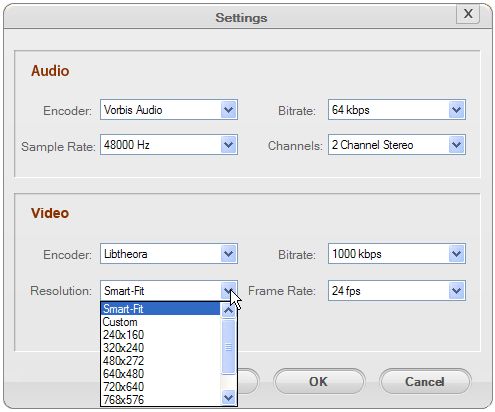
After finish the settings above, you can directly click Start button to convert FLV to Sony Vegas. The conversion duration varies depends on the size of your FLV files.
More functions of FLV to Sony Vegas Converter
YouTube FLV to Sony Vegas Converter can convert FLV to AVI, MPEG, MP4, MP3, 3GP, MOV, etc and extract Audio from FLV to MP3/WMA/OGG/WAV. It also features some simple editing functions like cut/crop/trim, very easy to handle.
Related Articles
- An Easy Way to Convert FLV videos to MP4, MPG, AVI, MOV, 3GP, WMV
- How to edit FLV video files with FLV Video Editor?
- The Best Way to Convert FLV to WebM on Windows and Mac (Mountain Lion included)
- Import video to Sony Vegas 10
- Kodak Zi8 to Sony Vegas
- Import Sony XDCAM XF MXF to Sony Vegas Movie Studio
- Convert MPEG/MPEG2/MP4 to Sony Vegas
- How to Open MKV in Sony Vegas
Hot Article
- Easy import AVI to iMovie ‘08/’09/’11
- Import MTS files to iMovie 08, 09, 11
- Edit Canon C500 MXF footage in Final Cut Pro
- Import MTS to Final Cut Pro on OS X Mountain Lion
- How to Open MKV in Sony Vegas
- Convert Youtube FLV into Sony Vegas
- AVCHD to Windows Movie Maker
- Convert/import MOV file to WMM
- Convert AVCHD to to iDVD for burning
- FLV to PPT converter



