

If you are frustrated about how to transfer your Kodak videos from Kodak Camera to Mac, then you can try this, the Mac Video Converter for Kodak Camera. This is the specifically designed video converter for those who are using Mac OS and want to convert their Kodak videos from Kodak Camera on Mac. With it, you can convert your Kodak videos from Kodak Cameras to all the current used formats, like avi, mp4, mkv, mov wmv, mpg, , dv, flv, swf, 3gp, mov, etc. In addition, you can also extract the audio files from Kodak videos and save them in mp3, aac, ac3, aiff, amr, flac, mka audio format.
More than running the conversion between video or audio formats, this Mac Video Converter for Kodak Camera can also serve as a Kodak Camera Video Converter for you to customize your own Kodak videos by, for instance, trimming, cropping, splitting, or merging.
As to trimming and cropping, you can just cut down your preferring part of the video; splitting, you can divide your video into several sections; merging, you can joint two video into one with the video converter.
Since it’s such a useful and all-in-one Kodak Camera video converter for Mac, how can we use it? You can follow the specific steps below to have a try:
Secure Download
30 Day Money Back Guarantee
In this step, you can download the video converter free on trial and remember to have it installed.
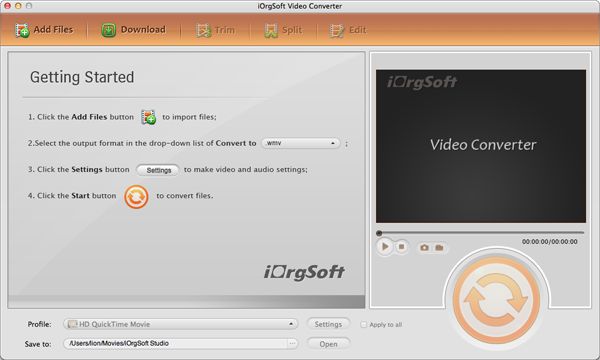
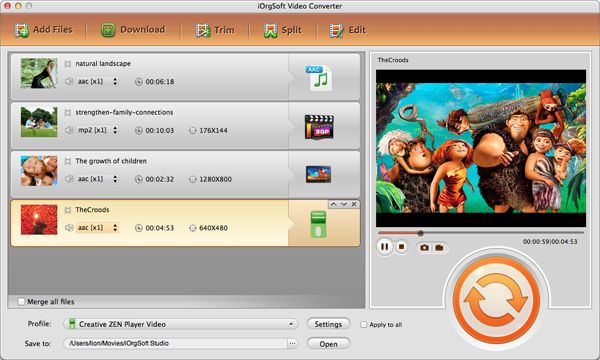
In the second step, you can simply double click the converter icon to launch it and then import your Kodak videos on it. You can load the videos by hitting the "Add Files" in the upper-left corner of the interface, then you should single click your to-be-convert video to import them. Batch conversion is available.
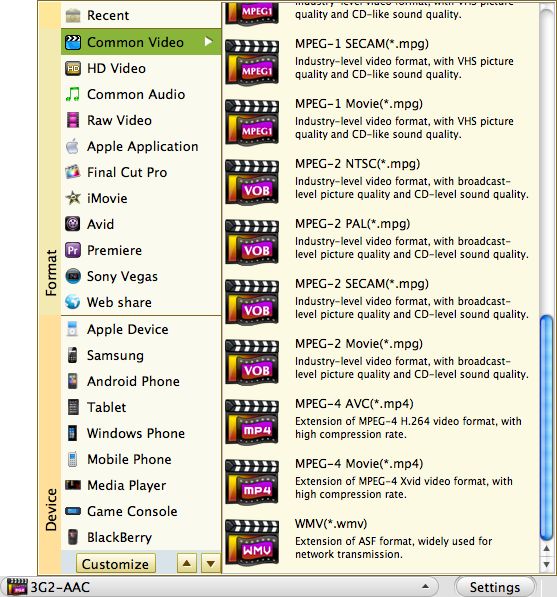
This is the most important step here, you should choose the target format to output. You can make it just striking the "Convert to" bar and choose the exact output format you need. Also, you can select your output path by hitting the "Save to" bar.
In the last step, you should start to convert your Kodak video by clicking the big round orange button, that is, the "Convert" button. After the conversion, you can find your converted videos by hitting the "Open" button in the bottom of the interface.
$35.00
Best program to convert AVCHD MTS, M2TS , AVCHD Lite to MOV, MP4,etc.on Mac with original quality.


$35.00
Transfer videos from portable cameras to any other popular format file on Mac for further use.
$39.95
Mac DVD burning program to burn videos to DVD on Mac and create DVD menu with stylish template.




Terms & Conditions| Privacy| Sitemap| Contact Us| About Us| Affiliate| Newsletter| License Agreement| Uninstall
Browser compatibility : IE/Firefox/Chrome/Opera/Safari/Maxthon/Netscape
Copyright © 2007-2016 iOrgsoft Studio All Rights Reserved