

In our daily work, we may need to copy or cite some content in the PDF ducument, however, as is known to all, PDF files do no allow to copy or edit directly. So, it is necessary to convert PDF to other formats for edit. This article will docus on converting PDF to TEXT for easy editing.
iOrgsoft PDF to TEXT Converter for Mac is a proper tool for Mac users to convert PDF files to text. This easy-to-use program allows you to conver the entire or certain pages in the PDF file to text. Now, follow the guide below to see how.
Firstly, you need to download and install this PDF to Text Converter, just click here to download the PDF to Text Converter for Mac and then install and run this program.
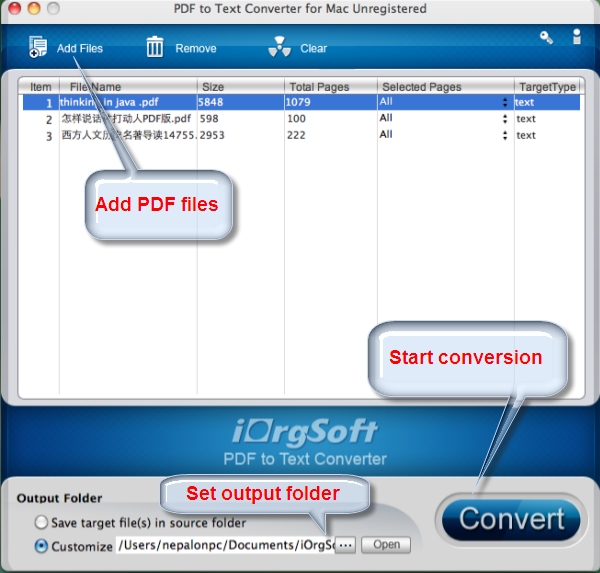
Hit on the 'Add Files' button to import the pdf files which you want to converte to text. Since this PDF to Text Converter for Mac supports batch conversion, you can convert many PDF files at one time.
iOrgsoft PDF to Text Converter allows you to customize output path, you can choose where you want to save the genereated text files. After theat, hit the Convert button to start converting PDF files to text. After a short while, the conversion will be finished. And then, hit the Open button to check the converted files.
$49.95
Fast convert PDF to Epub files massively or partially on Mac with original images, hyberlinks, etc


$69.95 $49.95
Fast convert Adobe PDF focuments to other format files like Word, Text, Image, Epub, and HTML on Mac
$49.95
Work independently to convert all PDF files to Html without Adobe programs support.




Terms & Conditions| Privacy| Sitemap| Contact Us| About Us| Affiliate| Newsletter| License Agreement| Uninstall
Browser compatibility : IE/Firefox/Chrome/Opera/Safari/Maxthon/Netscape
Copyright © 2007-2016 iOrgsoft Studio All Rights Reserved