


FLV/F4V to Windows Movie Maker

How to convert/put YouTube FLV/F4V video for Windows Movie Maker?
YouTube to Windows Movie Maker Converter can convert FLV/F4V videos from YouTube, Google, Yahoo, Myspace with fast speed and good quality. You can convert videos to avi, wmv, mp4, mov, mkv, etc.
Secure Download
Secure Download
Question:
Windows movie maker won't open an FLV file that i need? i downloaded a video from youtube but it won't open with Windows Movie Maker. It opens with adobe, but i can't edit it in that program. Does anyone know what i can do?
To edit YouTube videos in Windows Movie Maker you need to do a couple of things. First you need to download the video from YouTube. Next you need to convert the FLV file from YouTube to a video format supported by Windows Movie Maker (like WMV or MPEG1). To make the conversion, you need to download a converter like YouTube to Windows Movie Maker Converter, which comes in handy for all kinds of audio and video solutions:
Converting YouTube FLV or F4V to Windows Movie Maker compatible wmv,avi,mpeg
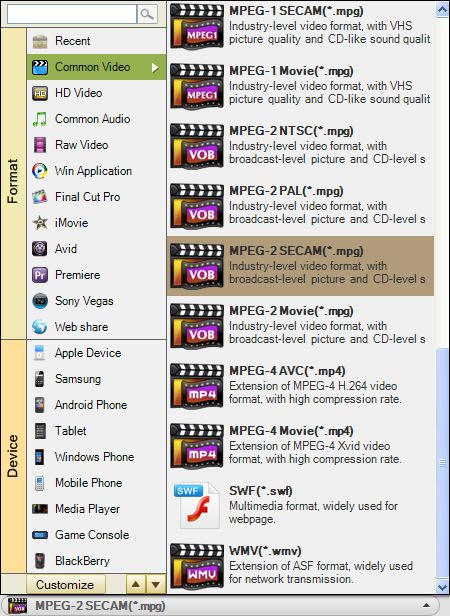
After load YouTube files into this Video Converter, you can select AVI or WMV for output format. Once the YouTube FLV/F4V conversion was done, you can get output files from destination folder.
How to import the converted videos into Windows Movie Maker?
Open Windows Movie Maker. Under the "Movie tasks", you just need to click the "Import video" and then you can import the video files into Windows Movie Maker. Once the video files are loaded, you can add different elements like video transition, video effects, titles or credits to create your own video.

How to put FLV/F4V videos into Windows movie maker?
1. Run the program and add files taht need to be converted.
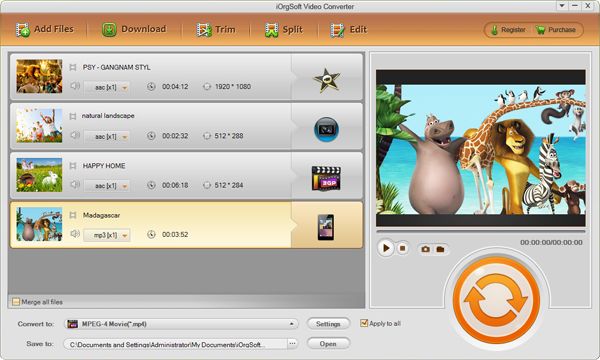
2. Choose proper output format at the Convert Panel.
3. Start the conversion process
Secure Download
Secure Download
Related Articles
- An Easy Way to Convert FLV videos to MP4, MPG, AVI, MOV, 3GP, WMV
- How to edit FLV video files with FLV Video Editor?
- Best flv player with playlist
- AVCHD to Windows Movie Maker
- Convert/transfer MXF for Windows Live Movie Maker
- Convert/import MP4 file to WMM
- Convert/import MOV file to WMM
- MOD to Windows Movie Maker
Hot Article
- Easy import AVI to iMovie ‘08/’09/’11
- Import MTS files to iMovie 08, 09, 11
- Edit Canon C500 MXF footage in Final Cut Pro
- Import MTS to Final Cut Pro on OS X Mountain Lion
- How to Open MKV in Sony Vegas
- Convert Youtube FLV into Sony Vegas
- AVCHD to Windows Movie Maker
- Convert/import MOV file to WMM
- Convert AVCHD to to iDVD for burning
- FLV to PPT converter



