

Digital camcorders like JVC GZ-MG30, Panasonic SDR-S100 , Canon FS100 and the like are popular now, when you make home movies with one them, you will get movies in MOD format., which can not be player on DVD player, you need a MOD to DVD Creator to burn MOD to DVD, iOrgsoft MOD to DVD Creator is a professional MOD to DVD Converter ,which will help you burn MOD videos to DVDs.
Secure Download
Secure Download
iOrgsoft MOD to DVD Creator offers easy but efficient solution to create DVD discs out of MOD/TOD files with high conversion speed and high output quality, save created video files to DVD folder or ISO image etc as your needs on Windows xp/vista/7. This step-by-step guide below shows you the simple steps. If you are a Mac user, click here to download the MOD to DVD creator for Mac.
You can click File button or Plus button to import file, both are OK.
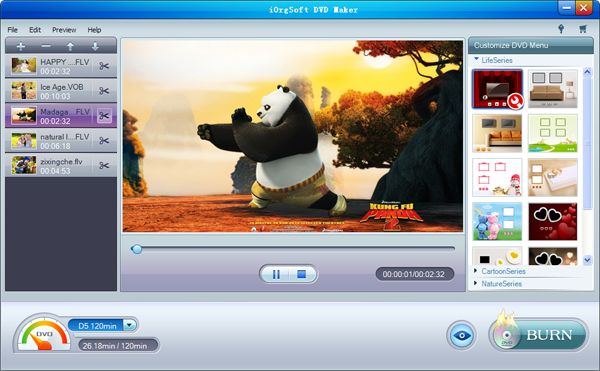
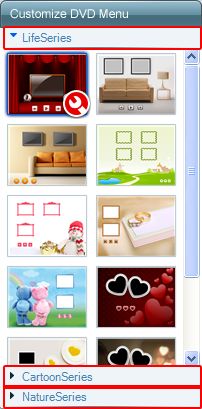
After add file, you can set customized menu, add background music and picture, select a frame , set a play/pause button ,these are optional.
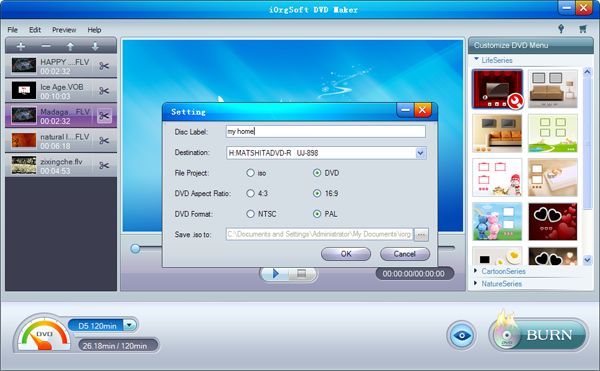
After all settings are finished, click Burning button to start burning, before the MOD to DVD Creator start burning, a window as below will appear, set the parameter according to your needs, then click OK, a progressing bar will show you the status of conversion.
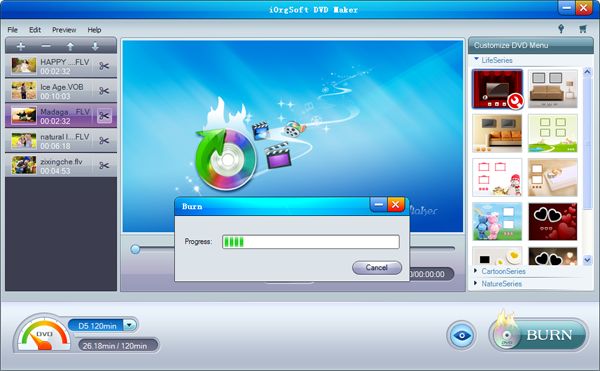
After the MOD to DVD creator finish converting, you can play the created DVD on DVD player then.
$35.00
Convert nearly any SD and HD video format to popular video formats with zero quality loss.


$39.95
Make DVDs from common videos in formats like mp4, wmv, mkv, mov etc to DVD fast and easily.
$35.00
Easily and quickly convert from HD/SD videos to common video formats with no quality loss.




Terms & Conditions| Privacy| Sitemap| Contact Us| About Us| Affiliate| Newsletter| License Agreement| Uninstall
Browser compatibility : IE/Firefox/Chrome/Opera/Safari/Maxthon/Netscape
Copyright © 2007-2016 iOrgsoft Studio All Rights Reserved