

You have a JVC Everio HDD cam and it forces you to work with these proprietary .MOD files, which limits you to bring into media players or video editing suites for playback or edit, besides, Canon FS, Panasonic SDR and Sony also export MOD video file, The MOD files also don't work perfectly with Apple editing application and most portable devices like iPad2,iPad, iPod, iPhone, PSP, Zune, Creative Zen and Mobile Phone etc.
Convert mod files to avi/mpg/wmv/mov/mpeg etc.
So you probably need to convert MOD files into some more plain formats like AVI,WMV, MPG,DV,MOV,MP4 then you can use in Windows media suites or apple iMovie, iTunes, Quicktime, FCE/FCP, iPod/iPhone/Apple TV etc. There is an excellent software Mac Mod converter that can serve your purpose.
Mac software mod converter
MOD Converter for Mac makes it easy for you to convert MOD files to all popular video and audio formats like AVI, WMV, MPG,MPEG,MP4,MOV, 3GP, MKV, FLV, M4V, SWF, RM, ASF, 3G2, MP3, AAC, WMA. etc. Convert and edit mod files on your Mac, iPod, iPhone, PSP, Zune and other portable devices at will.
MOD Converter for Mac offers diverse video editing functions almost as powerful as professional video editing software, including adjust output video quality, adjust 4:3 or 16:9 video aspect, add subtitle onto the output video etc.
Secure Download
Secure Download
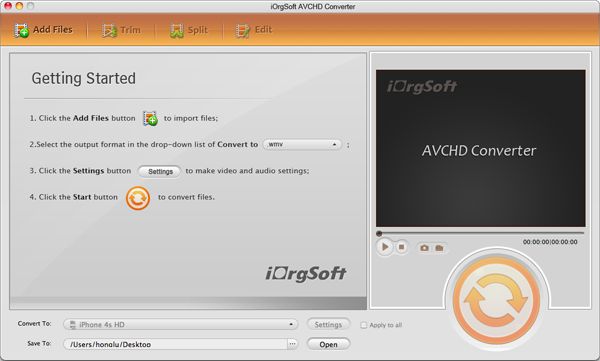
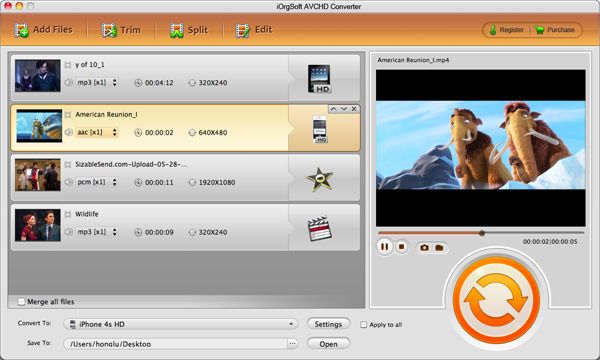
Click "Add File" and import the MOD video files you would like to convert from your camcorders to this program.
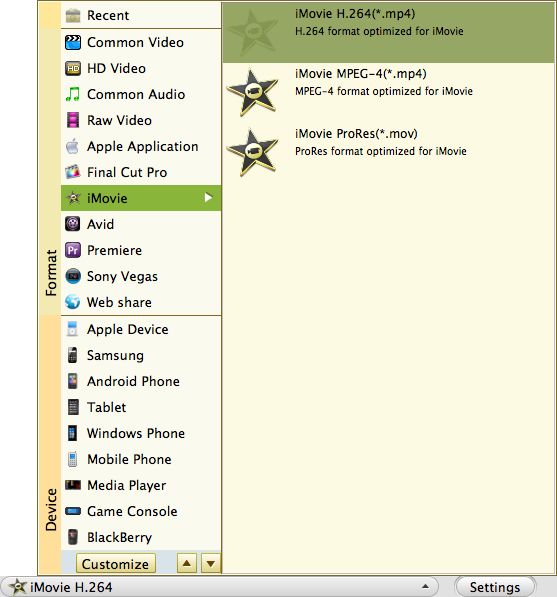
From the "Profile" drop-down list you can choose one format that meets your requirement.
Click the drop drown menu next to the "Output" field, chose the folder define destination folder for output files.
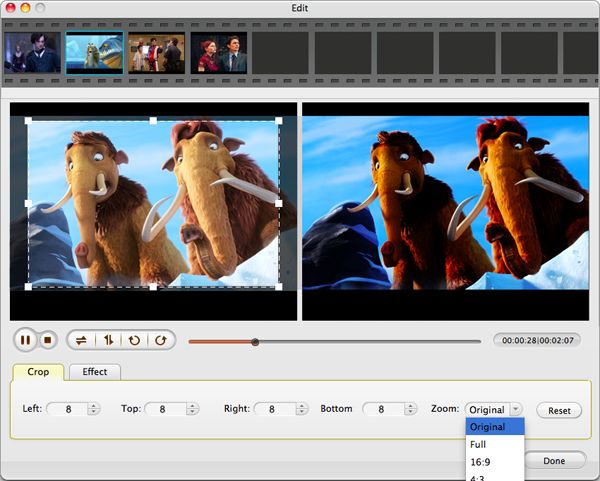
Click "Clip" "Edit" buttons to edit MOD video file on Mac to enrich your digital entertainment life.
Clip: specify the duration of the video you want to transform by setting the Start Time and End Time
Crop: Cut off the black edges of the original mod video using the "Crop" function and you can set aspect ratio to16:9, 4:3, full screen or just keep original.
Effect: Click "Effect" button to open the effect window. It allows you to adjust video effect like "Brightness, Contrast and Saturation" or apply other effect to your video.
Advanced settings: Click "Settings" to enter a new window. iOrgSoft MOD Converter for Mac offers the function to tune the video resolution, bit rate, frame rate and so on, you can adjust the parameters to get the most excellent output quality videos.
Start to convert mod file to mov/ avi/mpg/wmv/mpeg/mp4/flv/rm/3gp/mkv/m4v/swf etc.
Additional information: The known camcorder models that export the .MOD format are:
JVC: GZ-MG30, GZ-MG70, GZ-MG37, GZ-MG77, GZ-MG505, GZ-MG130, GZ-MG155, GZ-MG255, GZ-MG555
Panasonic: SDR-S100, SDR-S150, SDR-S510, SDR-S10, SDR-H18, SDR-H200, SDR-H40, SDR-H60, SDR-SW20
Canon: FS100, FS10, FS11
Sony HD: Sony HDR-UX5, UX7,Sony HDR-SR1, SR5, SR7, SR8, Sony HDR-SR11,Sony HDR-XR200V/520V,Sony HDR-CX520VE/505VE

$35.00
Best program to convert AVCHD MTS, M2TS , AVCHD Lite to MOV, MP4,etc.on Mac with original quality.


$35.00
Transfer videos from portable cameras to any other popular format file on Mac for further use.
$39.95
Mac DVD burning program to burn videos to DVD on Mac and create DVD menu with stylish template.




Terms & Conditions| Privacy| Sitemap| Contact Us| About Us| Affiliate| Newsletter| License Agreement| Uninstall
Browser compatibility : IE/Firefox/Chrome/Opera/Safari/Maxthon/Netscape
Copyright © 2007-2016 iOrgsoft Studio All Rights Reserved