

Wish to convert Adobe PDF file to Epub for easy sharing and browsing? Here is Tutorial about how to convert PDF to Epub by using iOrgsoft PDF to EPUB Converter.
* Download iOrgsoft PDF to EPUB Converter
* Relevant PDF files
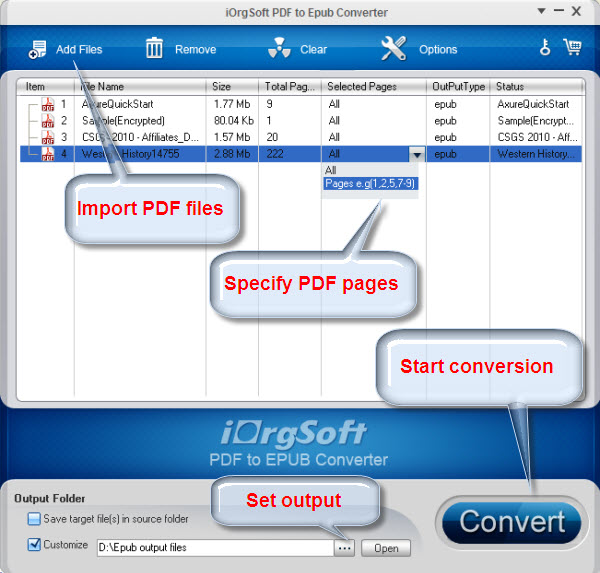
Click here to free download and install it by running iOrgsoft PDF to EPUB Converter , you will see the main interface as follows
Click " Add Files " to button to import local PDF eBooks to the program, you can find some general information of your PDF files after adding them in the conversion list.
1. You can save the destination file into the folder where the source file is by selecting the first option.
2. Or you can customize a folder to save the output files all together. Click to specify a folder on your computer to save the output epub book.Click the " Open " button to open the destination folder.
Click ' Convert ' button in lower-right corner and the conversion will be finished in seconds. Click the ' Open ' button below the panel, you can open the destination folder and find the converted ePub eBooks.
After converting PDF to EPUB, you can transfer the converted EPUB eBooks to iPad, iPhone and iPod Touch via iTunes for reading. If you need to convert PDF to EPUB for Mac , you can use PDF to EPUB for Mac .
$59.95
Transfer PDF to Word, Text, Image, Epub & HTML fast, maintaining original layout, hyberlink, etc


$39.95
Fast convert Adobe PDF(secured or not) files to Epub files for playback PDF on iPad, iPhone, etc
$69.99
Smart tool to convert PDF to FLV/SWF files and enable the files embeded on webs with ease.




Terms & Conditions| Privacy| Sitemap| Contact Us| About Us| Affiliate| Newsletter| License Agreement| Uninstall
Browser compatibility : IE/Firefox/Chrome/Opera/Safari/Maxthon/Netscape
Copyright © 2007-2016 iOrgsoft Studio All Rights Reserved