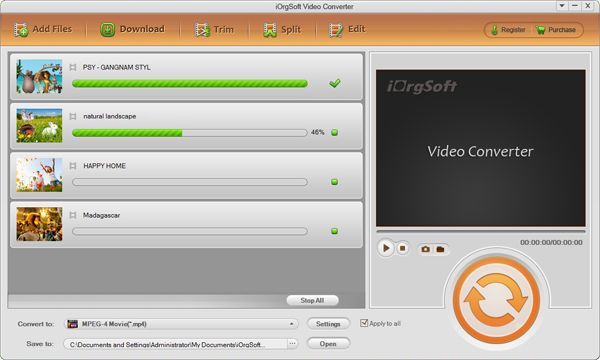
Convert RMVB to MP4 files.

Convert RMVB to MPEG-4 using iOrgSoft RMVB to MPEG-4 Converter
You have a rather long trip tomorrow so you decided to put some videos on your device like iPod, iPhone or PSP to watch. The problem is that the videos have are in .rmvb format, none of the portable player will play them unless they are in MP4. You have no idea how to convert rmvb to mpeg-4 (mp4)? iOrgSoft rmvb to mp4 converter is the program you need to fast convert all of the rmvb files with best output quality.
Secure Download
Secure Download
iOrgSoft RMVB Converter is powerful and easy-to-use converter which could convert from RMVB to almost all video formats, e.g. MP4,AVI, WMV, MPG, MPEG, M4V, FLV, 3GP, ASF, RM, MOV, the top-level video converter can bring you the astounding video quality with high fast conversion speed.
iOrgSoft RMVB to MP4 Converter can also convert batch loaded files and output the videos into various devices like iPod, iPhone, iTune, PSP, Zen, PS3 (HD support), XBox (HD support), phones and portable media players. Take your favorite video anytime and anywhere by editing your desired effect ---cutting/splitting the unwanted segments and merge into one file with other segments to enjoy your life!
How to convert RMVB files to MPEG-4 files?
Load RMVB files to the program
Click the Add Files button to open the navigating window, browse your folders to find the RMVB files you want to convert to MP4, select them and hit Open to import them to this software. Or directly open the folders then drag and drop the RMVB files to the main interface. Since batch conversion is supported, you can add many files at one time.
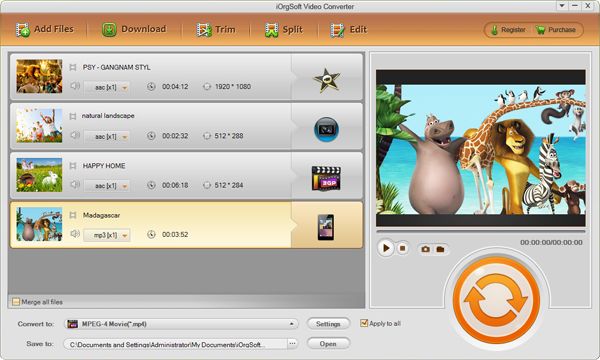
Select MP4 as output format
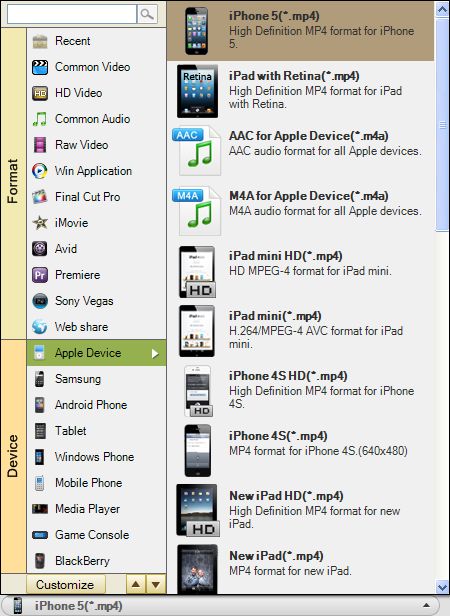
If you would like to import the output MP4 videos to your portable device such as iPhone, iPad, you easily find the optimized MP4 format for your device. Take iPhone 5 as example, you can go to the Apple device column to set iPhone 5 MP4 as output format. There are many more profiles optimized for devices are preset such as PSP, Creative Zen, Zune, Samsung Galaxy phones, tablets, and so on.
This RMVB Converter allows you to simply edit your videos, say, to split videos to pieces average, to trim the videos to extract parts in the video, to crop videos to remove unwanted area, add watermark to video, etc. You can easily make you videos more eye-catching with this program. For details, you can visit: User Guide of Video Converter
Convert RMVB to MP4
In the end, click the Convert button to start the RMVB to MP4 conversion. You will make it in a short time.