


Xvid to FLV Converter

What’s Xvid?
Xvid is a video codec library following the MPEG-4 standard, specifically MPEG-4 Part 2 Advanced Simple Profile (ASP). It allows for faster data transmission and more efficient storage of video files. Unlike the DivX codec, which is only available for a limited number of platforms, Xvid can be used on all platforms and operating systems for which the source code can be compiled.
Does YouTube accept files with Xvid codec? It depends. If it is an AVI file with Xvid, it can be uploaded to YouTube without any problem. Supposed that you have trouble in uploading Xvid files to YouTube, you may need to convert Xvid to YouTube-natively supported file format FLV.
iOrgSoft Xvid to FLV Converter is specially designed for YouTube users to seamlessly convert almost any video file format to FLV for excellent playback on YouTube. Moreover, there is an optimized preset for YouTube which you can choose to simplify your conversion.
Secure Download
Secure Download
Import Xvid video files
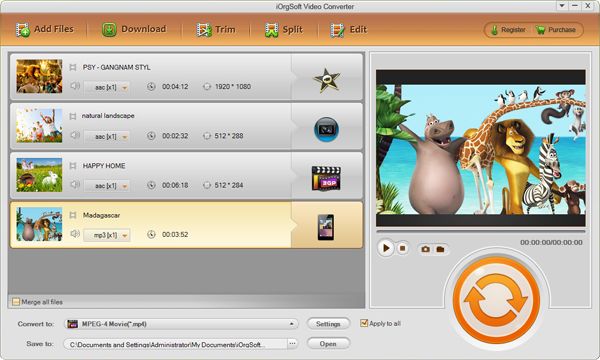
Click "+" button to add files with Xvid codec into the program.
Choose output file format
Go to the "Convert" section, set output file format as FLV in the drop-down list of "Format".
Make settings (Optional)
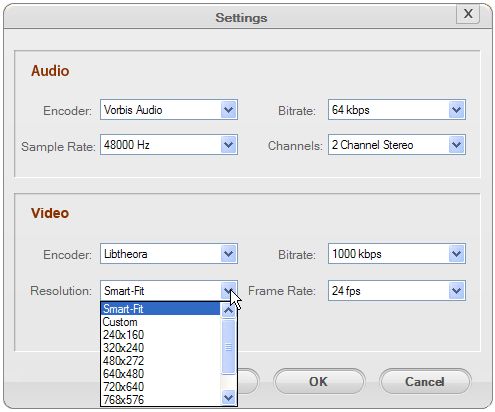
In the right section of "Convert" tab, you may notice the video and audio parameters. You can alter the video resolution, Frame Rate, Encoder, Bit Rate, Audio Sample Rate, Channel, Encoder and Bit Rate. In order to show the best video quality, you'd better check out whether the video resolution is 640x360 (16:9) or 480x360 (4:3), which is optimized for YouTube.
Convert Xvid to FLV
Hit "Convert" button to start converting Xvid to FLV. When the conversion is finished, you can reach the output at the first time.



