Mac Tivo to MP4 Converter

TiVo to MP4 Transcode TiVo Videos to MP4(MPEG-4) on Mac OS X Lion

Have you ever came across the circumstance: Accidantly I've got an s3 tivo using strictly OTA. I currently record Seinfeld daily and move the shows off of my tivo and on to my macbook computers HD.These files are recorded off of a HD station and thus are coming over 1280x720 and take up around 3GB each. I'd like to figure out a way to easily convert these into mp4 files to reduce the size and still be able to watch them on my tivo at my leisure.i 've tried several freeware,but failed, I am a newbie and so far haven't figured out how to accomplish this. Anyone out there that can help,Thanks in advance!

Now,the problem can have one happy ending with TiVo Videos to MP4(MPEG-4) Converter for Mac,with the powerful program you can open your mpg(mpeg-4) video from tivo videos (after the .tivo to .mpeg "conversion"), optionally edit out the commercials to reduce the file size even more, and then export the video to MPEG-4 (.mp4) format with fast speed and high quality output.

iOrgsoft TiVo Videos to MP4(MPEG-4) Converter for Mac OS X Lion is one simple yet powerful programme that convert Tivo to MP4(MPEG-4) video files and put favorite Tivo videos on MP4(MPEG-4) player or device like iPod,iPad,iPad 2,iPhone, Apple TV produces impressive recordings as MP4 video format. With the versatile programme, you can not only transcode Tivo to MP4(MPEG-4) video, but also convert Tivo to all popular video and audio files, such as AVI, MPEG, WMV, MOV, MP4, AAC, AC3, MP3, etc.

Another advanced feature of Mac TiVo Videos to MP4(MPEG-4) Converter is that it also provides the robust functions of do some editing by cobbling some clips, adjusting contrast, color and brightness and merging into one video file, The program is designed for both novice and pro alike users, all you need to do is a few mouse clicks,Just follow the step by step instruction below to learn more about how to use TiVo Videos to MP4(MPEG-4) Converter on Mac (including Mac OS X 10.7 Lion).


How to convert TiVo to MP4(MPEG-4) freely and easily step by step

This guide has 2 parts:
Parts 1: Transfer TV shows from TiVo to Mac
Parts 2: Convert TiVo to MP4(MPEG-4) for Mac OS X Lion

Parts 1: Transfer TV shows from TiVo to Mac

To transfer TV shows to Mac, you need to download TiVo Desktop Software for Mac
As we all know that the TiVo Desktop software for the Mac (supplied by TiVo) does not allow users to transfer TiVo recordings to Mac, you can transfer TiVo to Mac with specific software as long as your TiVo box is connected to your home network. Once you've recorded your favorite shows on your TiVo box, freeware like the TiVoDecode Manager can accomplish this task for you. Run the TiVoDecode Manager, and enter your TiVo's IP address in the "TiVo IP Address" box. Next click the Prefs button in the lower-right corner. Fill in the Media Access Key. A list of shows on your TiVo will appear in the Now Playing list. Select the show and click "Add Show To Queue". The selected show now appears in the Download Queue list. Click Download Location to select where you want to save it. The app allows you to convert TiVo shows to MPEG-4 video for iPhone as well.

Parts 2: Convert TiVo to Mpeg-4(.mp4)

After you transfer TiVo files to your Mac, you can convert them to Mpeg-4(.mp4) format. First of all, download iOrgsoft TiVo to MP4(MPEG-4) Converter for mac and launch the application. Then follow the steps below:

1. Free download the TiVo to Mpeg-4(.mp4) Converter mac and install it in your computer.

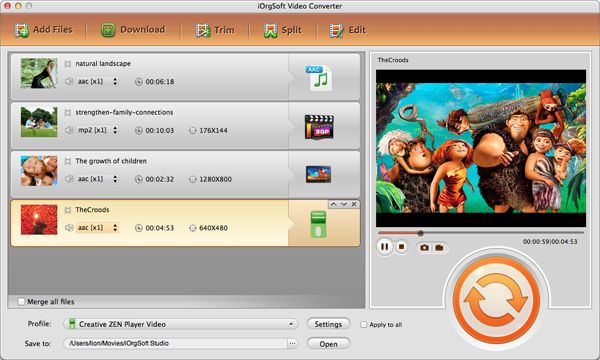
Tips: Click Video converter for Mac on the main interface, to pop up Video converter for Mac, You can see its main interface.
tivo to mp4 mac lion

2. Import TiVo, TiVo HD, TS TiVo files by clicking "Add files" button, batch conversion supported. These loaded files will be shown in Name list.
What's worth mentioning more about the software is that TiVo batch conversion is also supported. You can simply realize the function by checking "Merge into one file".

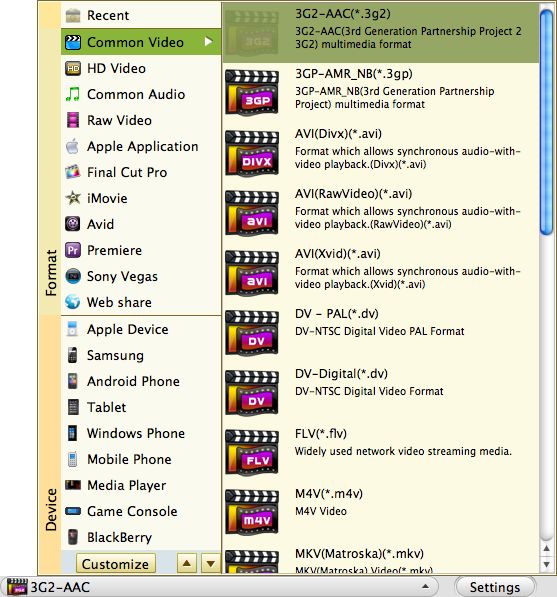
3. Click the "Profile" to choose Mpeg-4(.mp4) as output profile or you can select other your desired formats. Click "Destination" button to select destination folder where the converted files will be saved.

4. If you want to split the video or adjust video display, click "Edit" button to create a video you really want.
Clip: you can select certain length of the video you want to convert
Edit: set the aspect ratio and apply special effect to your videos
Merge: you can check "Apply to all" to apply the present settings to all the TiVo files.
Preview: preview the video in the left buttom and take some snapshots

5. Click the "Convert" button to start TiVo to Mpeg-4(.mp4) format Conversion!
After conversion, just transfer/sync your converted Mpeg-4(.mp4) video files.
convert tivo to mp4 mac lion


Top Seller for Windows

  1. DVD Maker
  2. Video Converter
  3. AVCHD Video Converter
  4. Video Editor
  5. MOD converter
  6. Flash Web Video Creator

Top Seller for Mac

  1. Video Converter for Mac
  2. Video Editor for Mac
  3. AVCHD Converter for Mac
  4. MTS Converter for Mac
  5. Movie converter for Mac
  6. SWF Converter for Mac

Topic

Follow Us

Join Our Newsletter: