


How to Convert FLV to MKV on Mac (Mountain lion included)

Chances are that you get some FLV videos either downloaded yourself from YouTube or shared by others, and now you want to convert them to MKV for better viewing or uploading to webs which only accept MKV files, you need a professional FLV to MKV Converter to assist you.
To complete the FLV to MKV conversion, iOrgsoft Video Converter for Mac is your ideal tool. It can convert FLV videos to MKV format with ease at a blazingly fast speed. In addition, the professional editing tool can help you trim video, crop video and adjust video effects(saturation, brightness, contrast) in an easy way . For Windows users, Video Converter is the best choice. The two versions share similar functions, the paragraphs below will show Mac screenshots.
Secure Download
Secure Download
Add FLV videos
Drag and drop the FLV videos you have downloaded on your computer to the Mac FLV to MKV Converter. You can also add files by clicking the "Add files" button on the top-left corner in the interface. Batch conversion function is offering, namely, you can add multiple files to the Mac apps at one time. 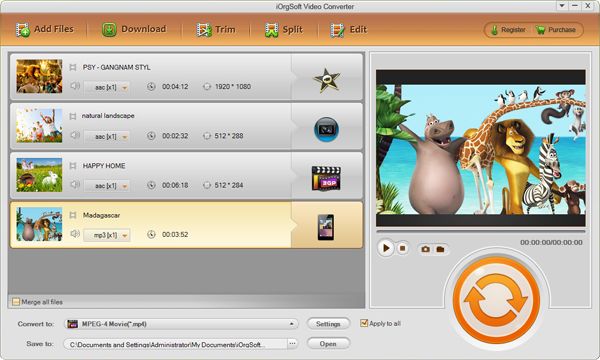
Choose output format and set output path
Click the format icon to open the format list, then go to "Common Video" column to select MKV(Matroska)(*.mkv) as output format. After that, select a folder to save the converted files under "Save" menu. 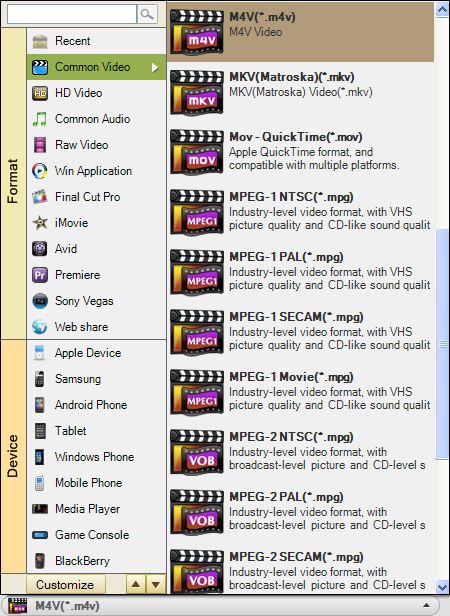
Start to convert FLV format to MKV
Finally, Click the "Convert" button to start converting FLV to MKV on Mac. You can let the smart FLV to MKV Converter for Mac finish the rest job itself. A bar will show you the status of the conversion, from which, you can get to know how long the conversion will take. After the conversion finished, you can hit "Open" to find the converted files. That's all.
Related Articles
- Edit/split/cut/merge/ FLV files
- Join flash video flv files on Mac
- How to convert FLV to 3G2 Files with FLV to 3G2 Converter for Mac
- Edit/split/cut/trim/join MKV files
- Convert RM to MKV on Mac
- How to Convert SWF to MKV on Windows and Mac
- Convert M2TS to MKV files on Mac
- Effortlessly Finish Converting MPG to MKV on Mac with Mac MPG to MKV Converter



